ZUS VACATION: Everything Entrepreneurs in Poland Need to Know
Starting from November 1, 2024, sole proprietors in Poland (JDG) can take advantage of the so-called "ZUS vacation" ("Wakacje od ZUS"), meaning they can get an exemption from paying social contributions ("składki społeczne") for one month per year.
First and foremost, this new benefit should interest entrepreneurs who pay Duży ZUS. If your Ulga na Start hasn't ended yet, you can skip the details for now and come back to this topic later.
Eligibility for ZUS Vacation
Under the ZUS conditions for 2026:
- In the month before applying, you were covered for at least one day by retirement, disability and accident insurance (emerytalne, rentowe i wypadkowe) through your JDG.
- In that month, you had no more than 10 counted insured people including yourself. This includes employees, zleceniobiorcy and cooperating persons; the ZUS guidance lists exceptions to the count.
- In the two years before the application year, you had no JDG revenue, or annual revenue in at least one of those years did not exceed the equivalent of EUR 2 million.
- In the previous calendar year and the current year up to the application date, you did not perform the same activities for a former employer as under an employment or cooperative employment contract in the year you started the JDG or the preceding year.
- Exemption from voluntary składka chorobowa requires at least one day of that insurance in both the application month and the preceding month.
- You have not used the vacation for the selected calendar year and have sufficient remaining de minimis allowance.
Outstanding ZUS debt does not by itself prevent you from using the vacation — ZUS explicitly explains this in its FAQ.
Which Contributions Are Exempt
ZUS vacation exempts you from paying social contributions:
- mandatory składki społeczne for yourself: emerytalne, rentowe i wypadkowe;
- voluntary ubezpieczenie chorobowe;
- contributions to the Fundusz Pracy and Fundusz Solidarnościowy.
In terms of numbers, the ZUS vacation savings work out the same as the "Ulga na Start" benefit. Keep in mind that the health insurance contribution ("składka zdrowotna") must be paid regardless.
How to Apply for ZUS Vacation
Apply online from Konto płatnika in eZUS, in the month before your vacation month. For example, an application for December 2026 must be submitted in November 2026. The original version of this guide was developed by Olga Korneva.
The interface below was checked in November 2026. The answers in the pictures illustrate the form: choose the options that match your own situation.
Creating the Document
Sign in to eZUS and choose Konto płatnika for your JDG. Open Katalog usług in the left menu.
If you interrupt the application
The wizard saves a draft. Resume it through Sprawy płatnika → Według statusu → Robocze. Leaving the form does not mean a previously saved draft has been deleted.
Selecting RWS
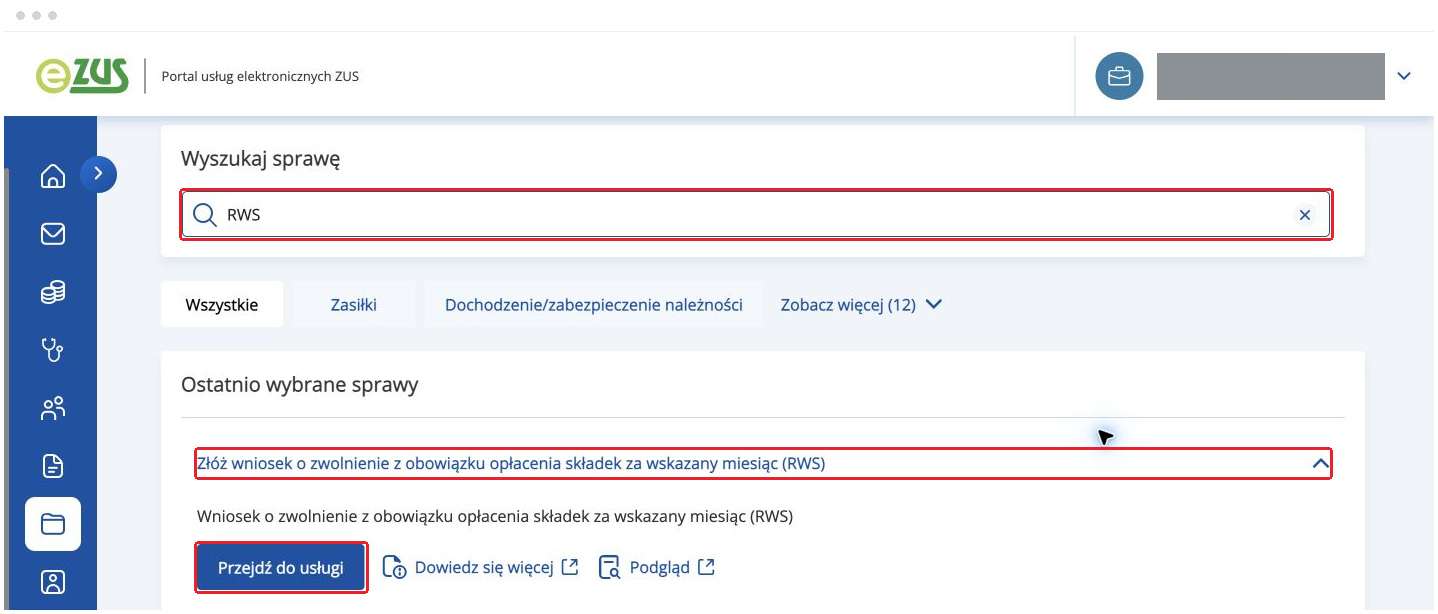
Enter RWS in Wyszukaj sprawę. Expand Złóż wniosek o zwolnienie z obowiązku opłacenia składek za wskazany miesiąc (RWS) and click Przejdź do usługi. The card may appear under Wakacje składkowe or among recently used services.
Selecting the Type
Select the document type Wniosek.
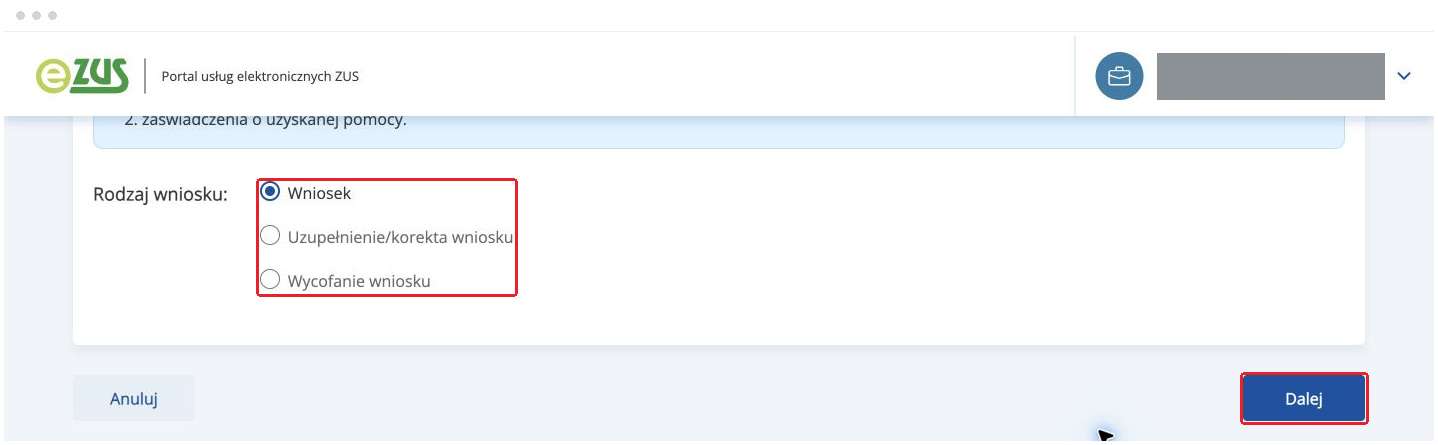
The screenshot shows the first of 3 available options:
- Application
- Amendment / correction of the application
- Withdrawal of the application
Click Dalej to proceed to the next screen.
Personal Information
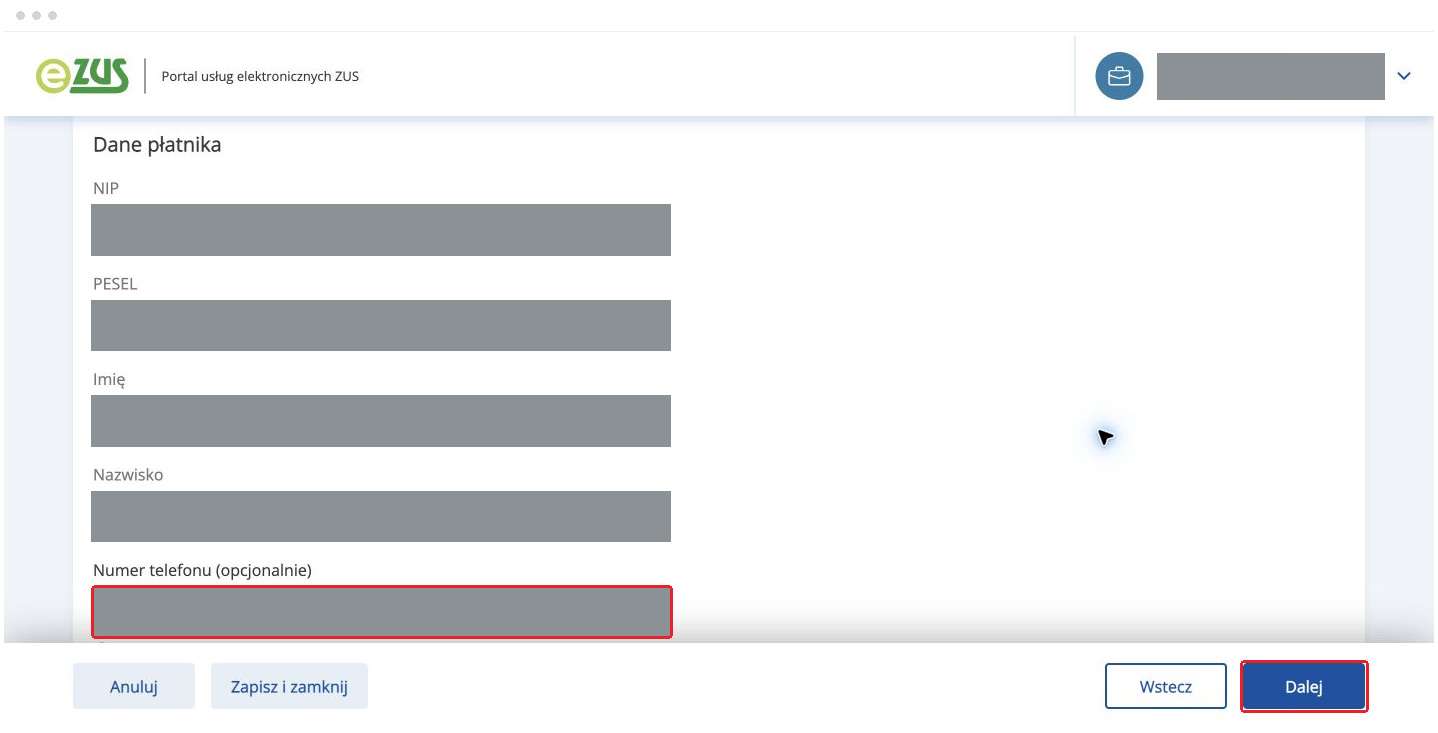
Check the automatically filled NIP, PESEL, first name and surname. These fields cannot be edited in the wizard. The phone number is optional. Click Dalej.
Selecting the Indicated Month
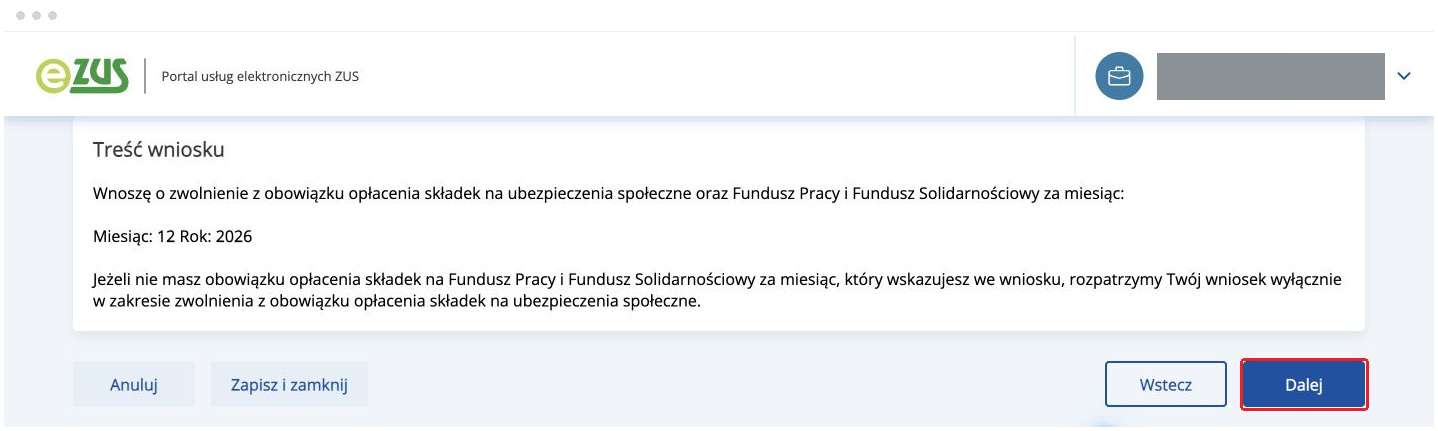
In Treść wniosku, the month and year are filled automatically: the month after the application. The picture shows 12 / 2026 for an application in November 2026. This step does not offer an arbitrary month selector. Check the period and click Dalej.
Declaring the Use of De Minimis Aid
ZUS vacation is de minimis aid. Declare de minimis aid received over the past three years, not just the current calendar year. The total limit is EUR 300,000 over a rolling three-year period; the remaining allowance must cover the requested exemption. Previous ZUS vacations also count as this aid.
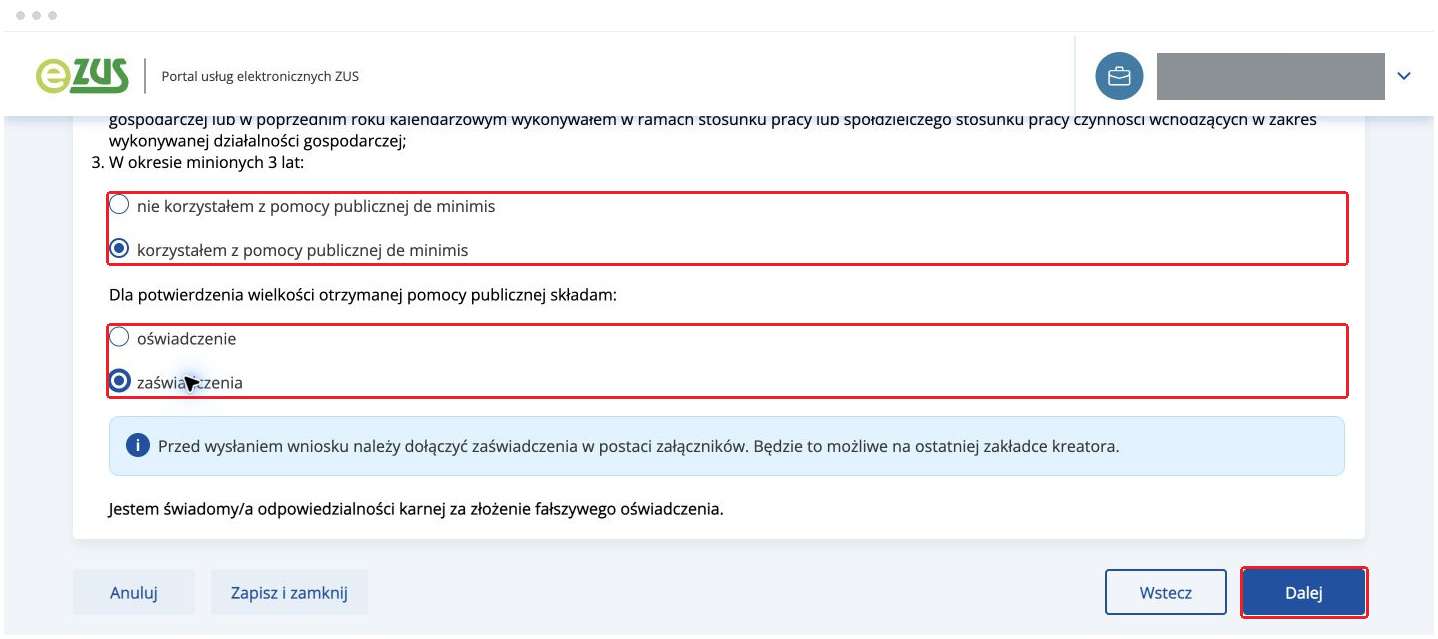
Quote
I declare that:
- for the last two calendar years preceding the year of application, I did not receive revenue from non-agricultural economic activity, or in at least one year of the last two calendar years preceding the year of application, I received annual revenue from non-agricultural economic activity that did not exceed the equivalent in zlotys of 2 million euros;
- as an insured person in the calendar year preceding the year of application and from the beginning of the calendar year in which I submit the application until the date of its submission, I did not conduct non-agricultural business activity for a former employer for whom, in the calendar year of starting business activity or in the previous calendar year, I performed, within the framework of employment or cooperative employment relationships, activities falling within the scope of the business activity;
- Over the past 3 years:
- I did not use de minimis state aid
- I used de minimis public aid To confirm the amount of state aid received, I am providing:
- a declaration
- certificates
 Before submitting the application, attach the certificates as appendices. Use the separate Załączniki step before Podsumowanie.
I am aware of criminal liability for making a false declaration.
In the example, the option with using state aid is checked — specifically, using ZUS vacation in the previous calendar year. Select the option that applies to you.
FAQ
A common question from people who aren't sure: "what if I received de minimis aid and just don't know?"
You will know if you received such aid: the entire amount must be strictly accounted for to avoid exceeding the three-year threshold, so any body providing such aid is required to issue a certificate of aid with a specific date and amount. Additionally, there is a register of entrepreneurs who received aid, where you can look yourself up. Enter your NIP, click the button to select the time range pełne 3 lata wstecz, check the field tylko de minimis, and then click Wyszukaj według wybranych kryteriów. A file will be generated listing all individually received benefits along with their total sum.
"Where do I get the de minimis aid certificate?"
In Sprawy płatnika → Według tematyki, open Zobacz więcej → Wakacje składkowe. Find the processed application with a positive result and choose ⋯ → Zobacz szczegóły. Under Odpowiedzi z ZUS, open the received reply using ⋯ → Zobacz szczegóły.
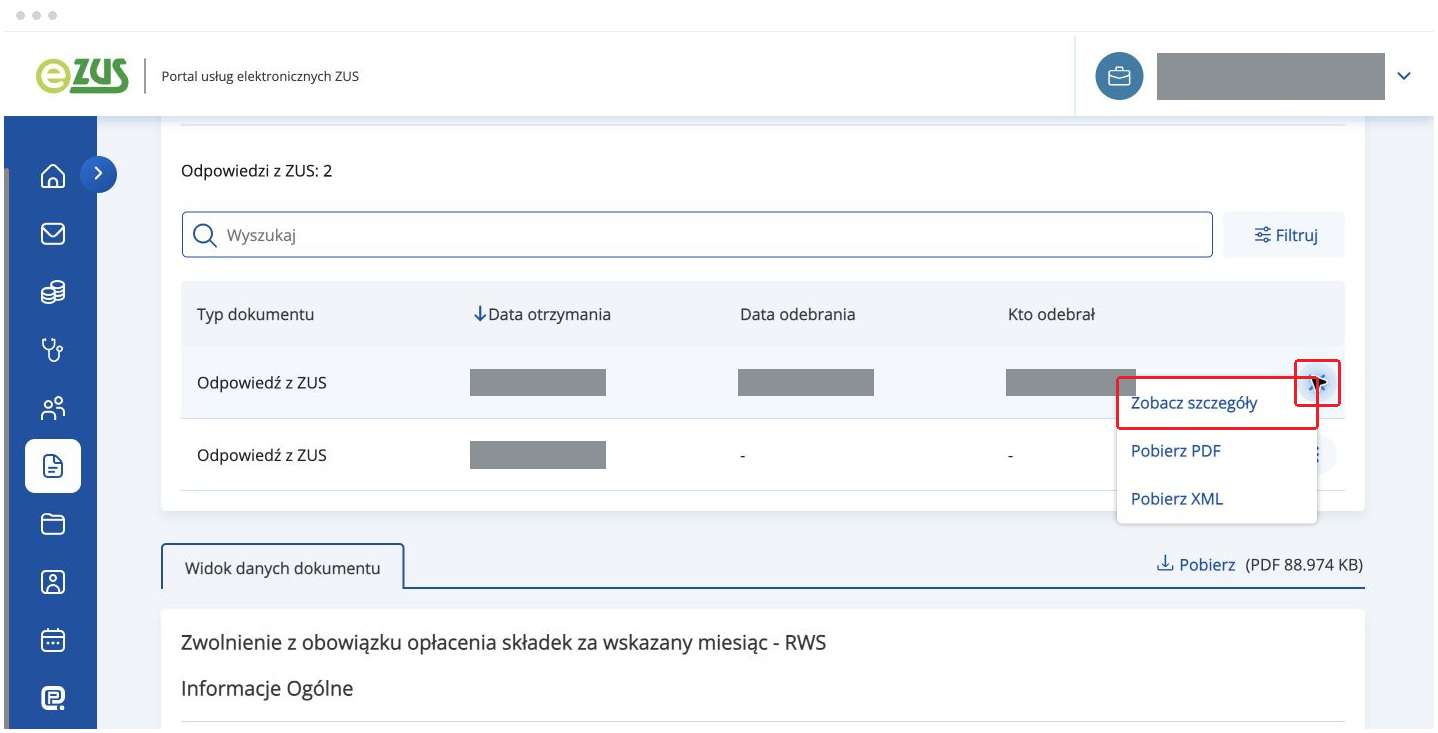
In the reply’s Podsumowanie, download Zaświadczenie_rws-r-zasw.pdf. Informacja_rws-inf-zwol.pdf, the information granting the exemption, is available there too.
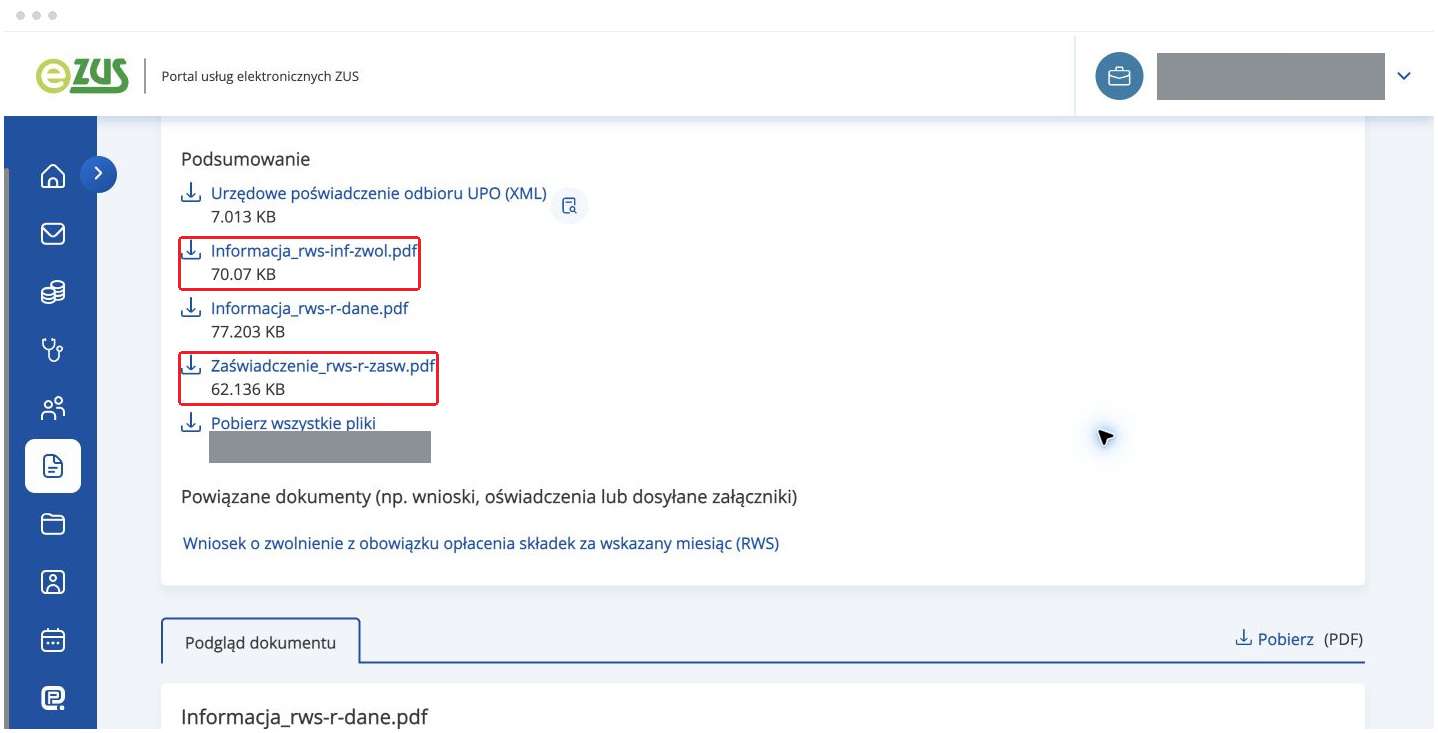
The certificate for the new aid is in the ZUS reply. Attachments to the original RWS application contain the documents you submitted, including certificates for earlier vacations.
Entrepreneur Categories
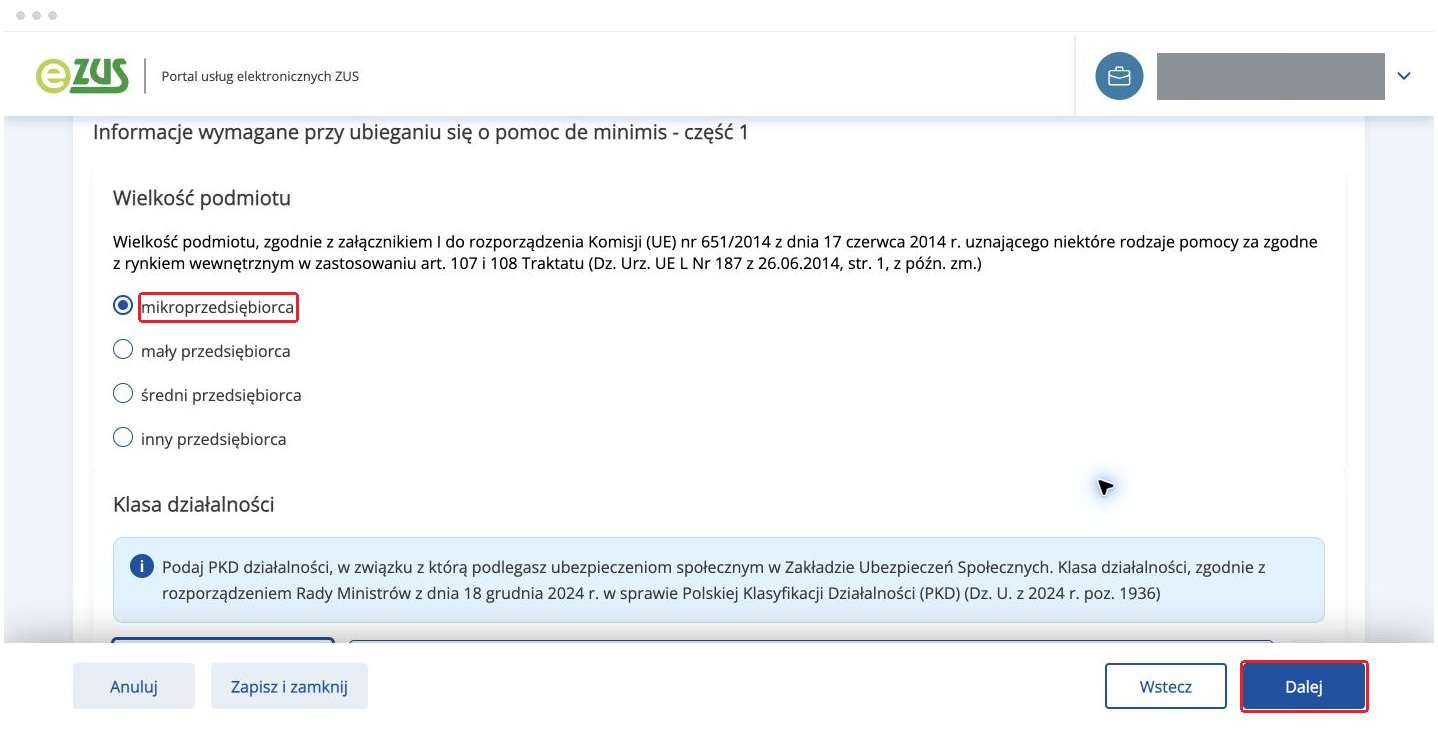
Translation of the content with category explanations
Translation
Entity size
The size of the organization in accordance with Annex I to Commission Regulation (EU) No 651/2014 of June 17, 2014, recognizing certain types of aid as compatible with the internal market in accordance with Articles 107 and 108 of the Treaty (regulation).
Micro entrepreneur — an entrepreneur who, for at least one of the last two financial years, cumulatively met the following conditions:
- had an average of fewer than 10 employees;
- achieved net annual turnover from the sale of goods, products, and services, as well as from financial operations, not exceeding the equivalent in zlotys of 2 million euros, or the total assets on their balance sheet prepared at the end of one of those years did not exceed the equivalent in zlotys of 2 million euros.
Small entrepreneur — who, for at least one of the last two financial years, cumulatively met the following conditions:
- had an average of fewer than 50 employees;
- achieved net annual turnover from the sale of goods, products, and services, as well as from financial operations, not exceeding the equivalent in zlotys of 10 million euros, or the total assets on their balance sheet prepared at the end of one of those years did not exceed the equivalent in zlotys of 10 million euros, and — is not a micro entrepreneur.
Medium entrepreneur — who, for at least one of the last two financial years, cumulatively met the following conditions:
- had an average of fewer than 250 employees;
- achieved net annual turnover from the sale of goods, products, and services, as well as from financial operations, not exceeding the equivalent in zlotys of 50 million euros, or the total assets on their balance sheet prepared at the end of one of those years did not exceed the equivalent in zlotys of 43 million euros, and — is not a micro entrepreneur or a small entrepreneur.
Other entrepreneur — who does not fall into any of the above categories.
The example selects Micro entrepreneur. Choose the category that matches your business. The insured-person limit for the vacation and the enterprise-size classification are separate conditions. Click Dalej.
Activity Class
In Klasa działalności, open the PKD picker with the magnifying-glass button. In Wybór kodu PKD, check Wersja PKD: classifications 2007 and 2025 are available. Use the classification under which your activity is registered in CEIDG. Find your code, select its row and click Wybierz, then Dalej.
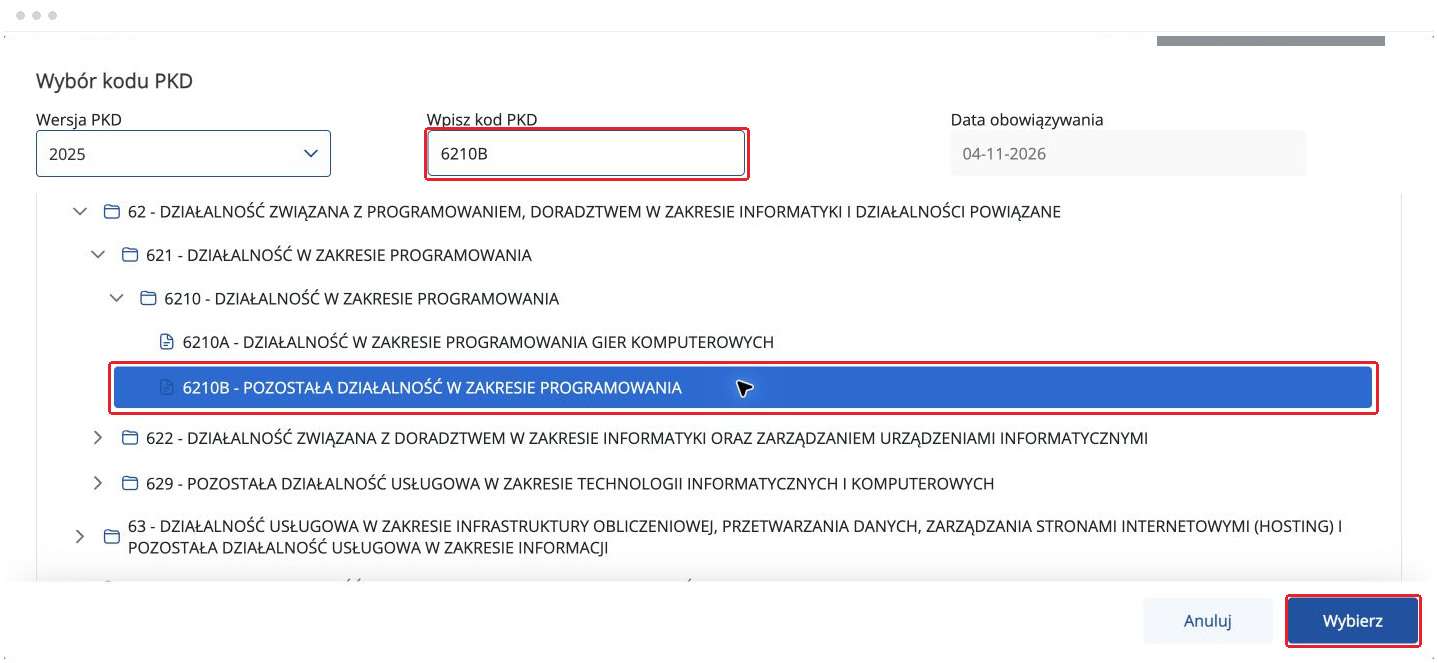
The picture illustrates 6210B (62.10.B) from PKD 2025 — select your own activity code.
Relationships with Other Entrepreneurs
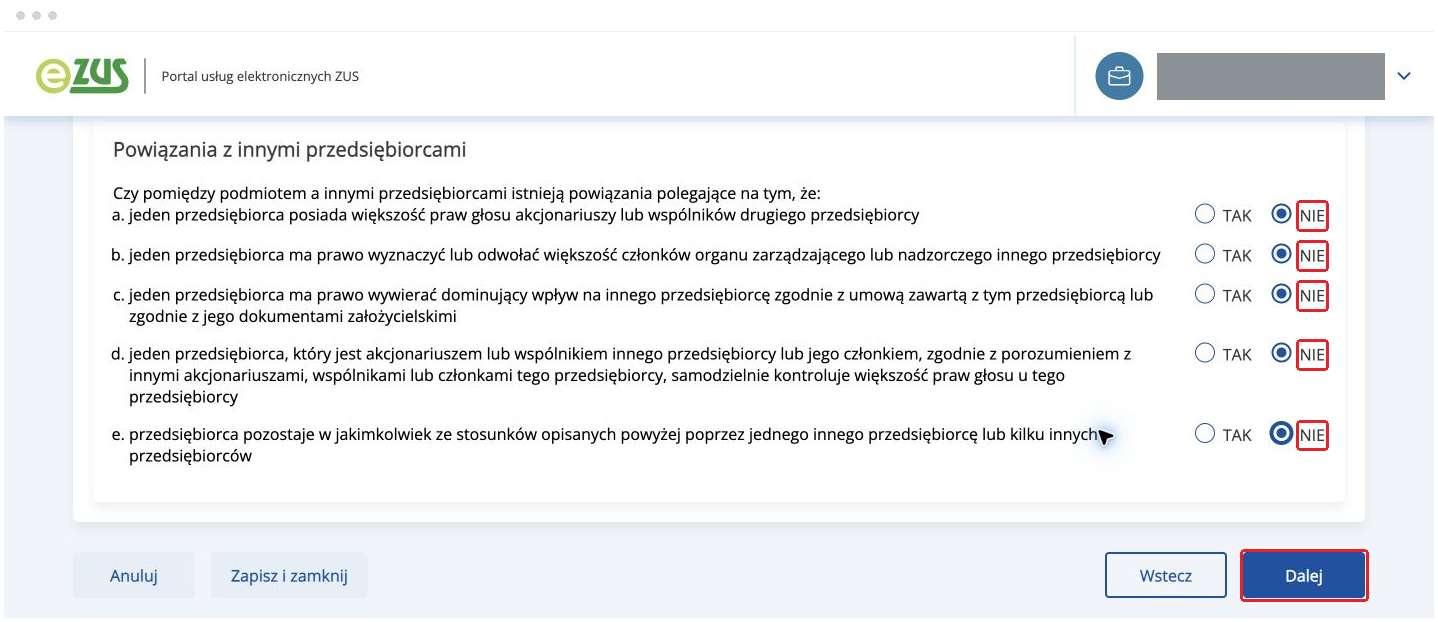
Translation
Is there a relationship between the entity and other entrepreneurs, consisting of the fact that:
- one entrepreneur holds a majority of voting rights of shareholders or partners of the other entrepreneur;
- one entrepreneur has the right to appoint or dismiss a majority of the members of the management or supervisory body of the other entrepreneur;
- one entrepreneur has the right to exercise dominant influence over the other entrepreneur under a contract concluded with that entrepreneur or under its founding documents;
- one entrepreneur, who is a shareholder, founder, or member of the other entrepreneur, independently controls most of the voting rights of that entrepreneur under an agreement with other shareholders, partners, or founders;
- the entrepreneur is in any of the relationships described above through one or more other entrepreneurs.
In the example, all categories are marked as negative. If even one answer is TAK, you will need to provide the NIP numbers of the other entrepreneurs, as well as the amount of de minimis aid. Select the options that apply to you.
Information About the Entity's Origin
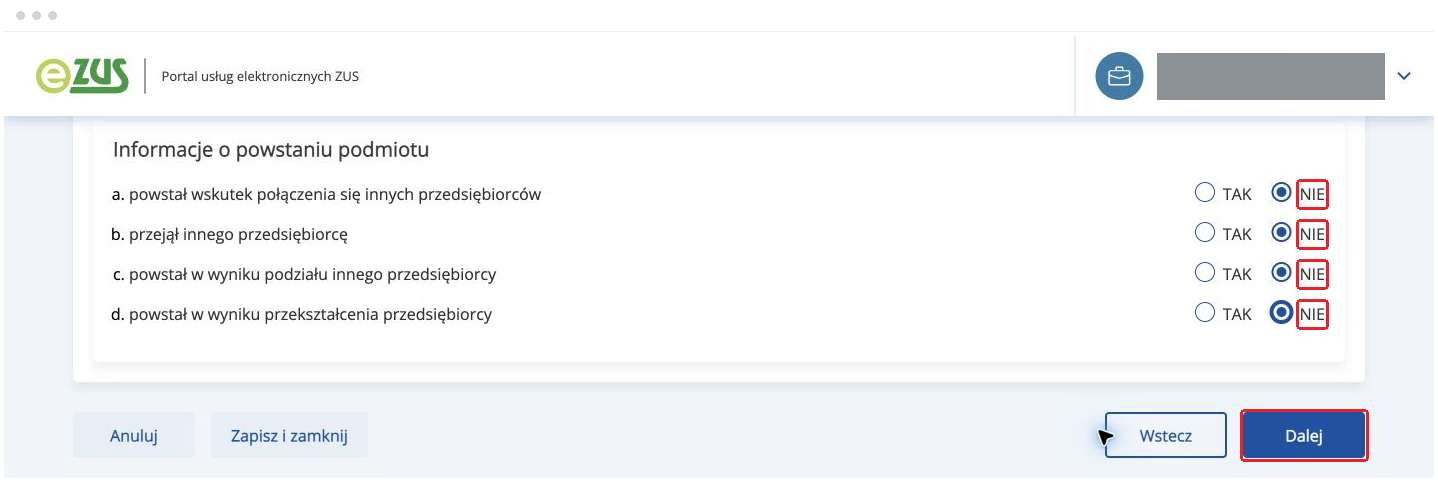
Translation
In the past 3 years, the entity:
- was created as a result of a merger of other entrepreneurs;
- accepted/took over another entrepreneur;
- was formed as a result of a split of another entrepreneur;
- was created as a result of a transformation of an entrepreneur.
In the example, all categories are marked as negative. If even one answer is TAK, you will need to provide the NIP of the other entrepreneur, as well as the amount of de minimis aid. Select the options that apply to you.
Information About Specific Activity Categories
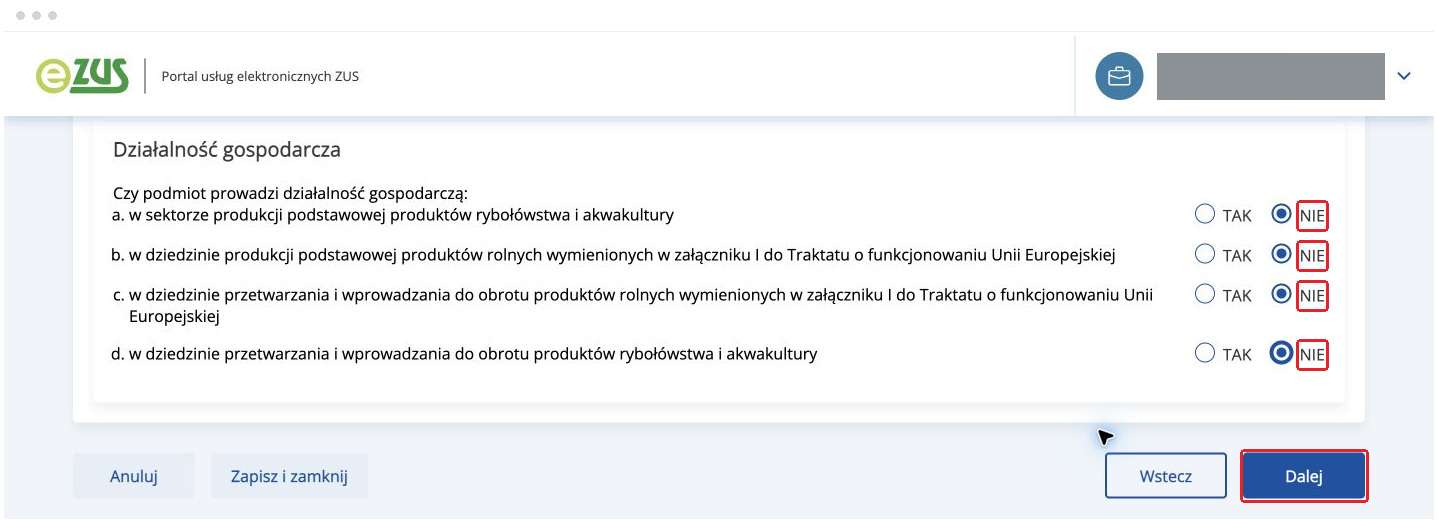
Translation
Information about business activity conducted by the entity to which de minimis aid is to be granted
Does the organization to which de minimis aid is to be granted conduct activity:
- in the primary production sector for fishery and aquaculture products;
- in the primary production of agricultural products listed in Annex I to the Treaty on the Functioning of the EU;
- in the processing and marketing of agricultural products listed in Annex I to the Treaty on the Functioning of the EU;
- in the processing and marketing of fishery and aquaculture products.
In the example, all categories are marked as negative. Select the options that apply to you.
Signing and Sending
In the separate Załączniki step, attach certificates if you selected korzystałem z pomocy publicznej de minimis → zaświadczenia. Click Kliknij tutaj, aby dodać plik. With that confirmation option selected, the wizard will not let you continue without an attachment.
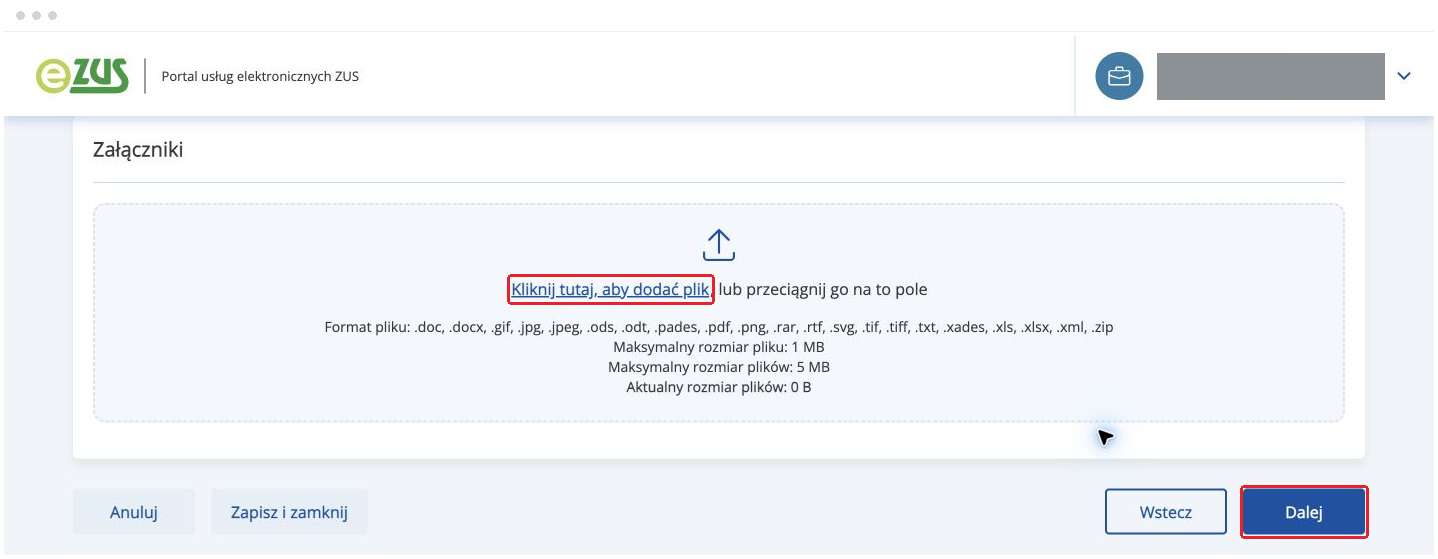
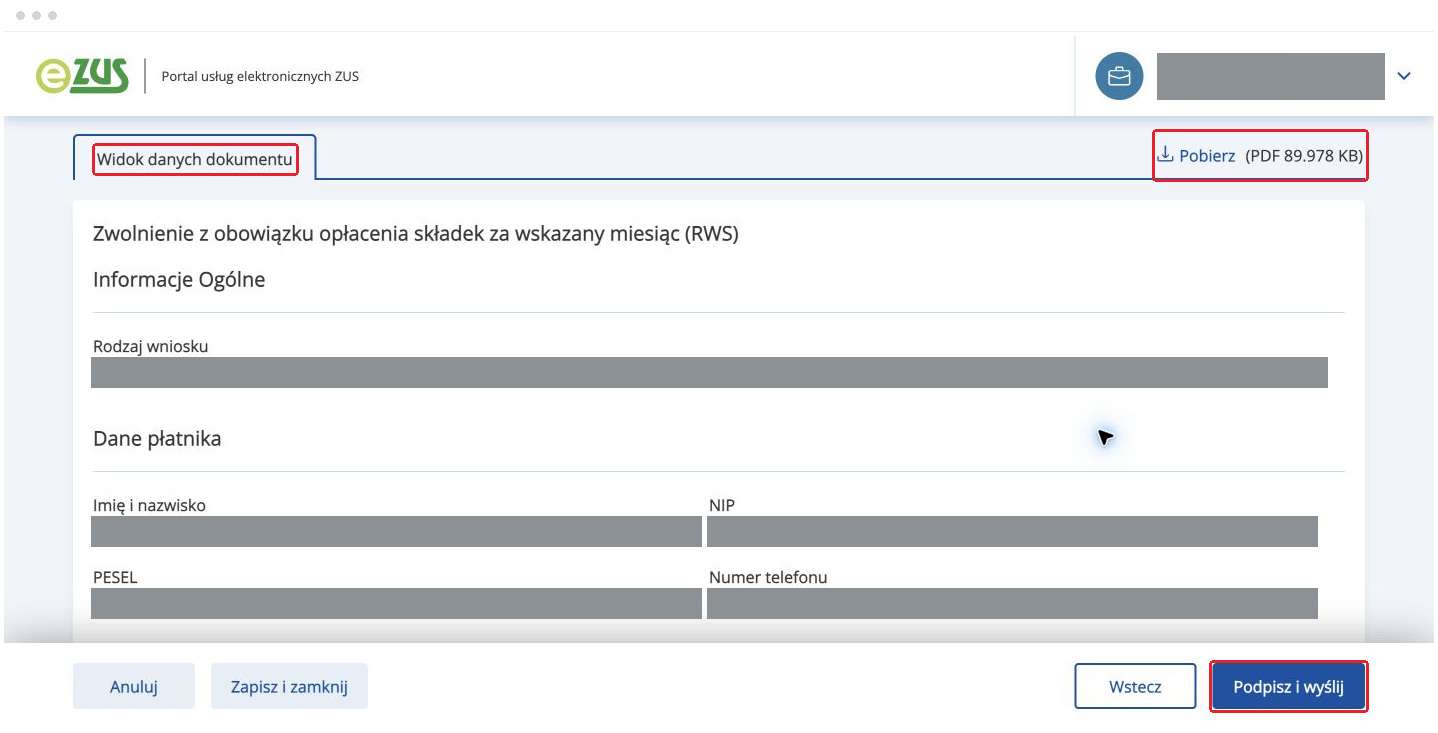
Click Dalej. In Podsumowanie, review the application in Widok danych dokumentu or download its PDF using Pobierz. Then click Podpisz i wyślij.
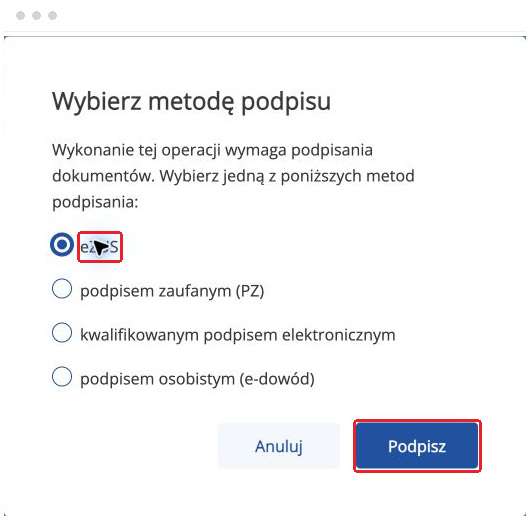
Wybierz metodę podpisu opens. To sign through the current account, select eZUS and click Podpisz. podpisem zaufanym (PZ), a qualified signature and e-dowód are also available. The former option name Podpis profilem PUE is no longer used.
Success Criteria
After sending, open Sprawy płatnika → Według statusu → Wysłane, enter RWS in the search field and choose ⋯ → Zobacz szczegóły for your application.
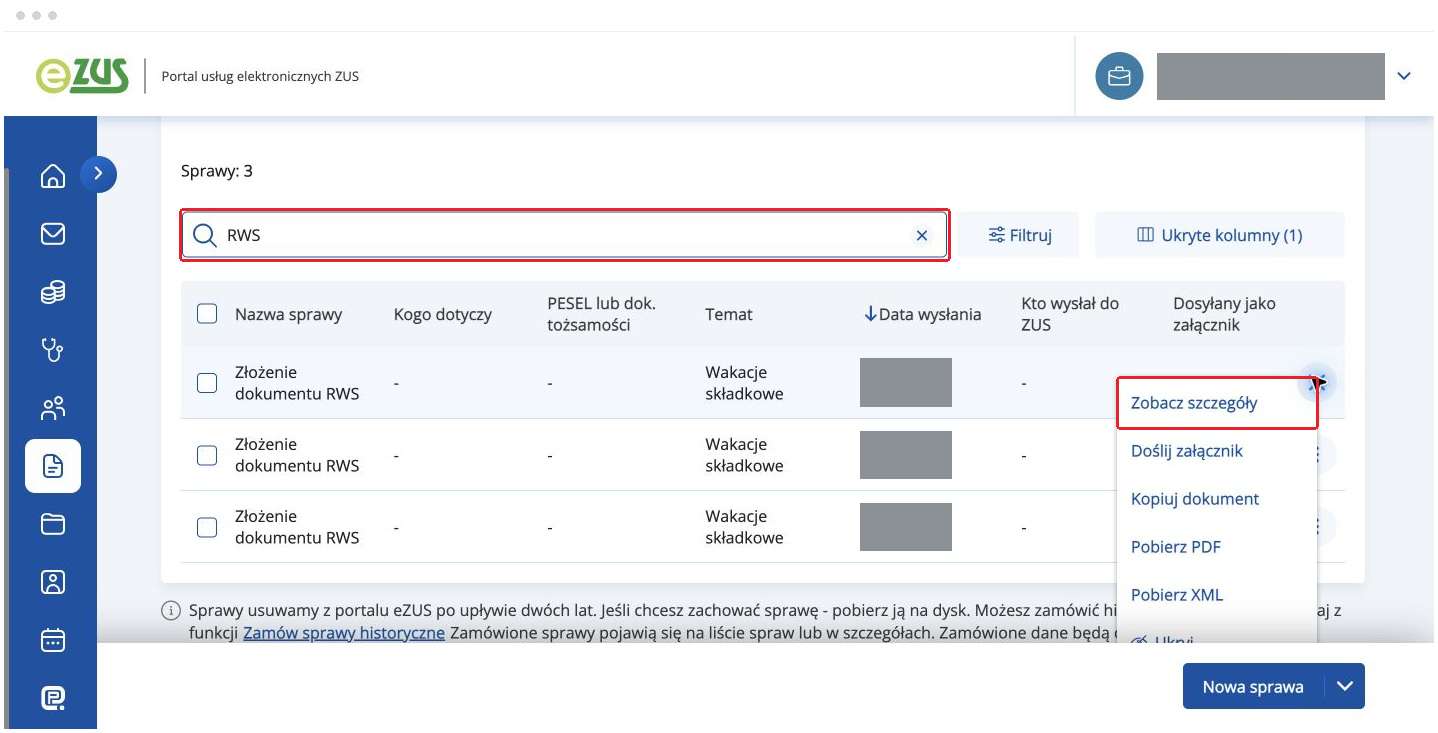
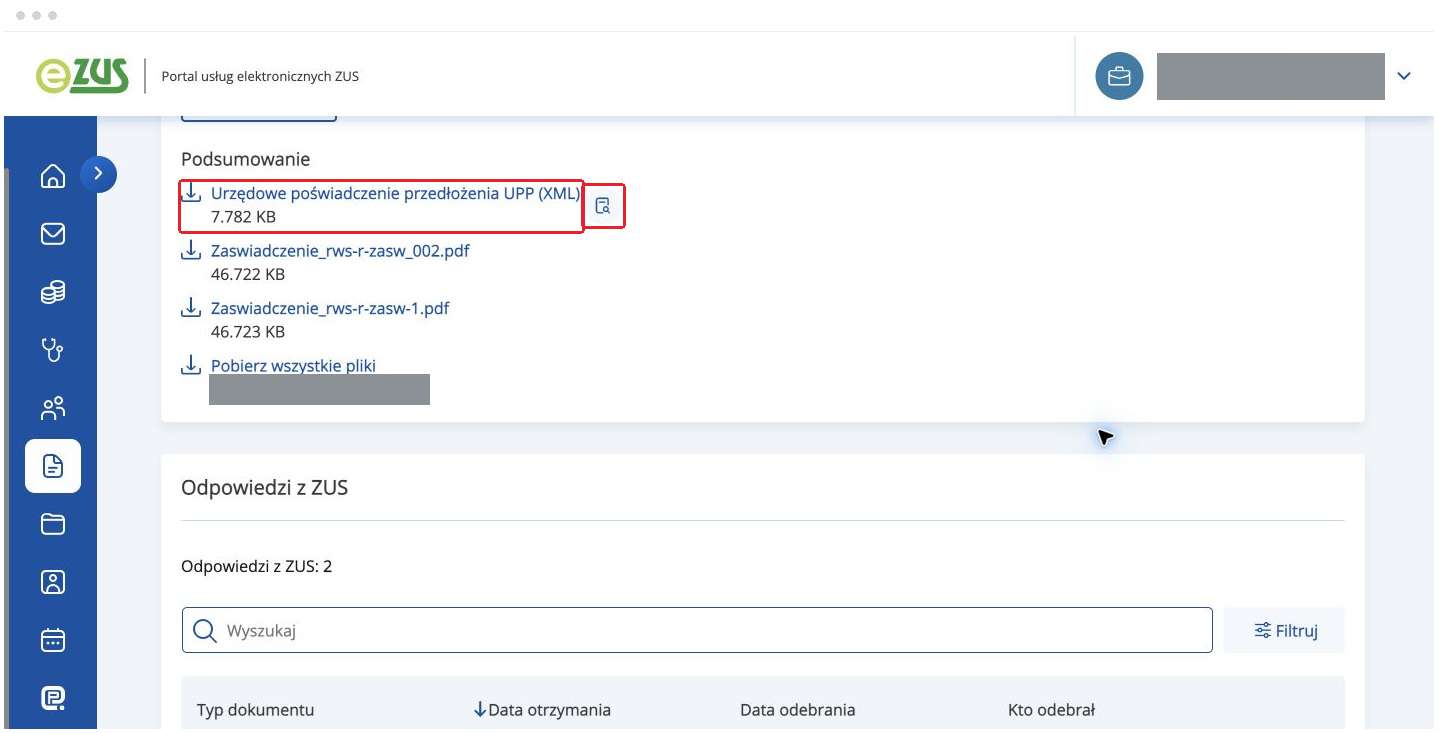
Podsumowanie provides Urzędowe poświadczenie przedłożenia UPP (XML) and its Podgląd. This confirms submission. Check the ZUS reply separately for the application outcome.
What's Next
Wait for the reply in eZUS. Find a new application under Sprawy płatnika → Według statusu → Wysłane. Processed RWS applications are also available through Według tematyki → Zobacz więcej → Wakacje składkowe; a positive result displays Zwolnienie przyznane. Open ⋯ → Zobacz szczegóły.
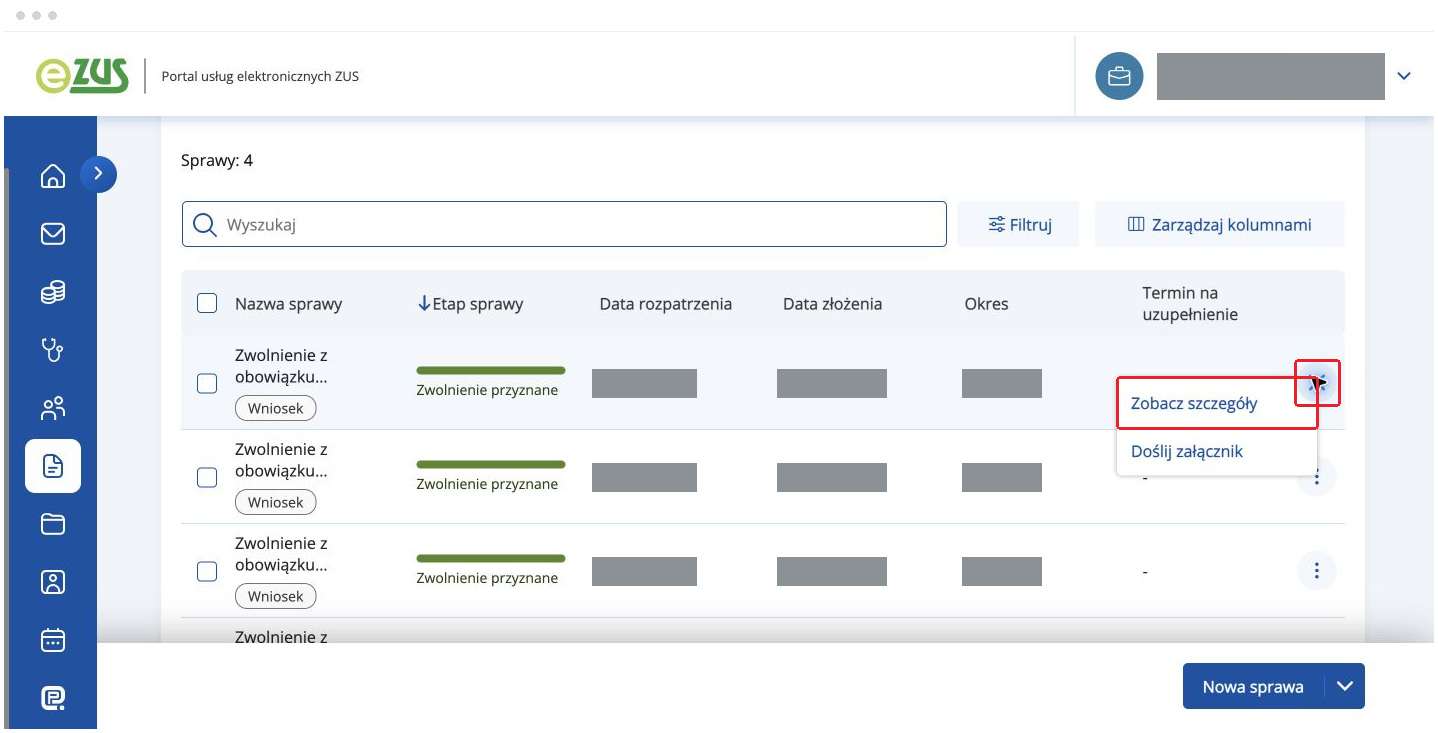
Replies are inside the case under Odpowiedzi z ZUS. They may include interim letters and the final Informacja o przyznaniu zwolnienia. The FAQ above explains how to download the de minimis certificate. If notifications are enabled, eZUS will also notify you of a new letter by email or SMS.
If you don't pay the voluntary składka chorobowa (the one for sick leave) and apply for the vacation, ZUS may at some point send something like this:
Zawiadomenie
Zakończyliśmy postępowanie w sprawie ustalenia prawa do zwolnienia z obowiązku opłacenia składek za czerwiec 2025 r., wszczętego na Pana wniosek z 29 maja 2025 r.
W wyniku weryfikacji stwierdziliśmy, że nie spełnia Pan następujących przesłanek ustawowych:
• nie podlegał Pan dobrowolnemu ubezpieczeniu chorobowemu w miesiącu złożenia wniosku albo w miesiącu go poprzedzającym
Może Pan wypowiedzieć się o zgromadzonej w Zakładzie dokumentacji w terminie 7 dni od daty doręczenia tego zawiadomienia.
This letter concerns the składka chorobowa condition. Check the final scope of the exemption in the ZUS reply.
If your application is approved, you need to notify your accountant
If you handle your own accounting, see the section Monthly reports during ZUS vacation.
Monthly Reports During ZUS Vacation
The entrepreneur must submit the following documents for themselves:
- ZUS RCA 1: a personal social insurance report (składka na ubezpieczenie społeczne) accounting for the vacation. The report must specify the appropriate Kod tytułu ubezpieczenia - 0514 for Duży ZUS, 0574 for Składki preferencyjne, 0594 for Mały ZUS Plus.
- ZUS RCA 2: a personal health insurance report (składka na ubezpieczenie zdrowotne) and, if applicable, voluntary sick leave contributions (dobrowolne ubezpieczenie chorobowe) without accounting for the vacation. The report must specify the current Kod tytułu ubezpieczenia - 0510 for Duży ZUS, 0570 for Składki preferencyjne, 0590 for Mały ZUS Plus.
- ZUS DRA: a contributions declaration accounting for the vacation. In the declaration, in the social insurance payment sections (Składki finansowane przez sections), the values should be entered in the budżet państwa fields instead of ubezpieczonych.
The ZUS vacation benefit does not apply to employees. If the entrepreneur has employees, they must submit the following documents for them:
- ZUS RCA: a personal report without accounting for the vacation.
How to Generate Reports for ZUS Vacation
If you use accounting software (Infakt, WFirma, iFirma), you can generate the reports using those tools. Otherwise, you can follow the instructions below. These instructions are written for a payer on Składki preferencyjne. The periods and amounts in these pictures are examples: use your own reporting month and check the calculation. The original version of this guide was developed by Olga Korneva.
Report Creator for ZUS Vacation in PUE ZUS
In the new Konto płatnika, open ePłatnik in the left menu (finding the section). The remaining steps use the previous interface: Kreatory → Obsługa rozliczenia → Dalej.
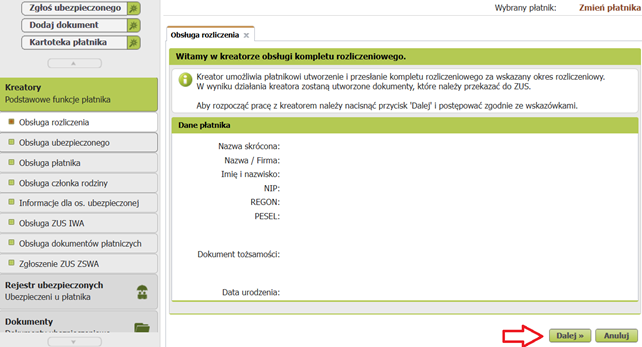
Nowy komplet rozliczeniowy - Dalej.
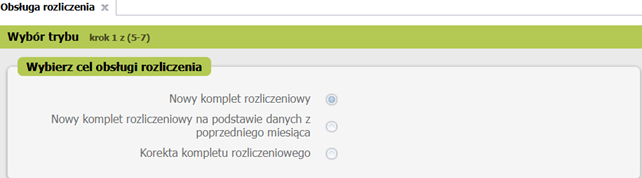
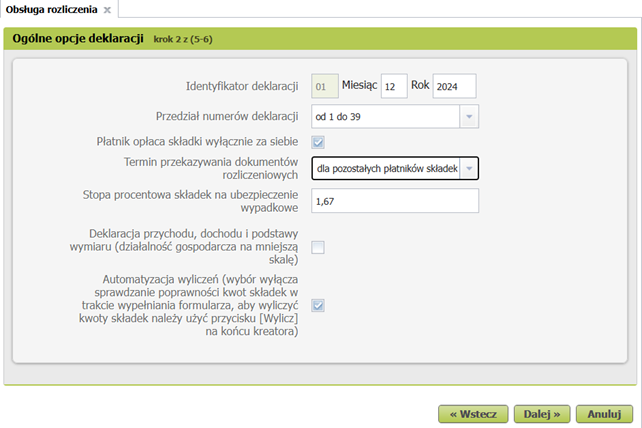
The date field will be pre-filled; verify the remaining fields and click Dalej.
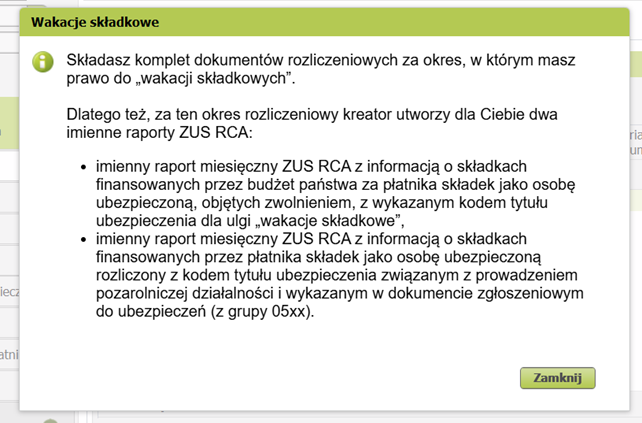
An informational message will pop up saying that ZUS RCA declarations will be generated — click Zamknij.
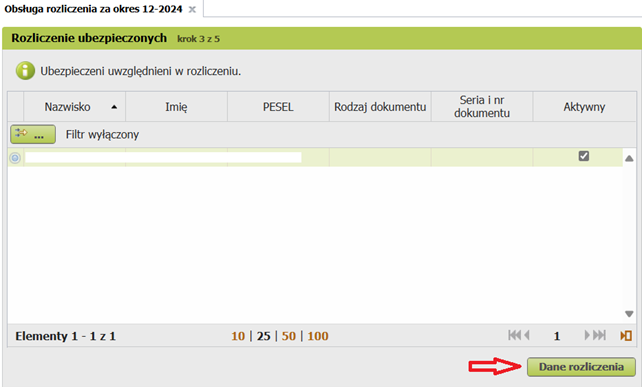
On the Rozliczenie ubezpieczonych panel, click Dane rozliczenia.
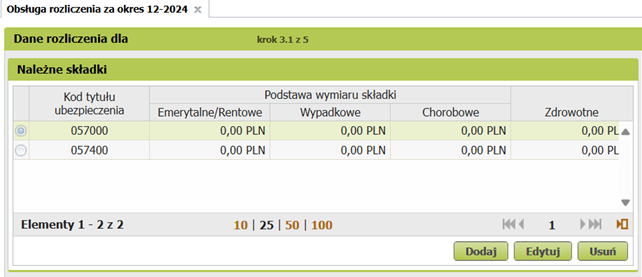
On the Dane rozliczenia panel, select element 057000 and click Edytuj.
On the panel, select the second tab Ubezpieczenie zdrowotne, wypłacone świadczenia.
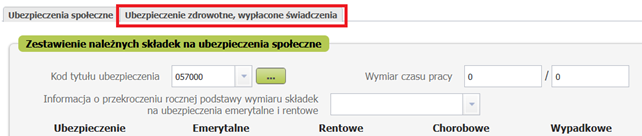
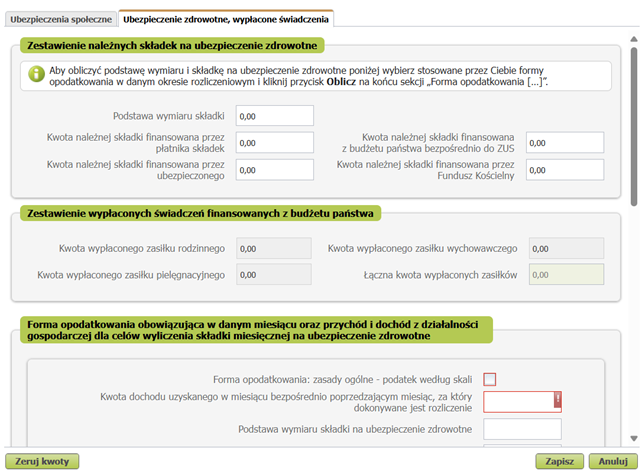
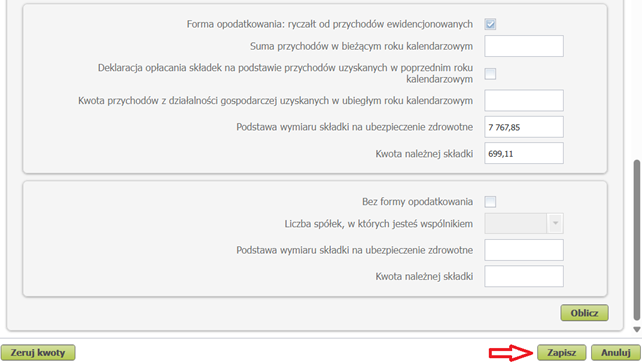
Select the appropriate tax form. To select ryczałt, you need to scroll down.
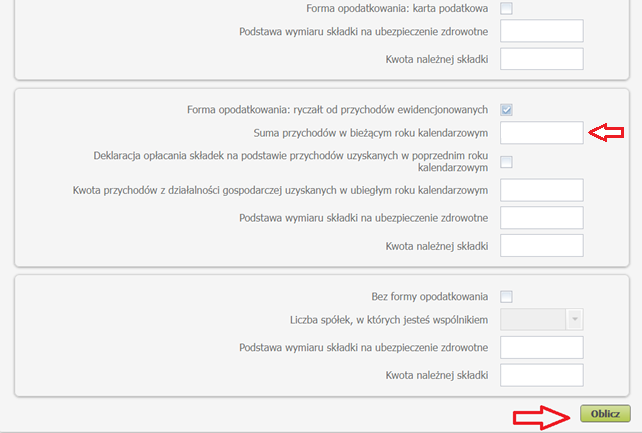
In addition to the checkbox, for ryczałt you need to enter the income amount for the current calendar year (in the example — for 2024). Click Oblicz.
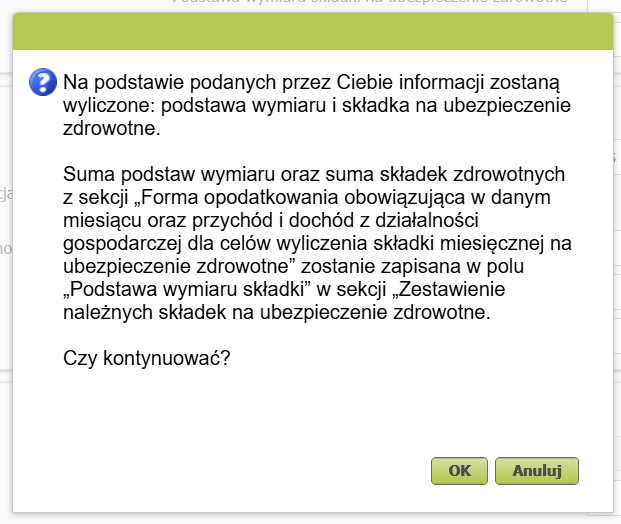
An informational message about the calculated base and health insurance contribution based on the provided data will pop up. Click Ok.
The corresponding fields are filled in automatically. Click Zapisz.
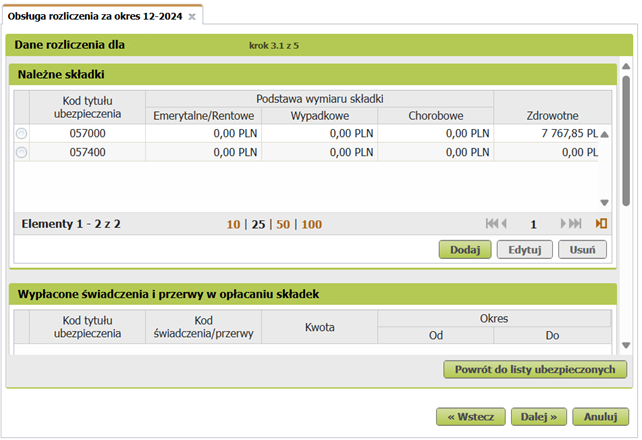
Return to the Dane rozliczenia panel and click Dalej.
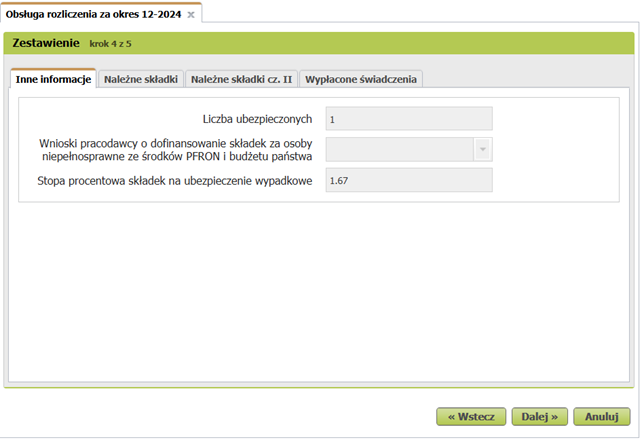
On the Zestawenie panel, click Dalej.
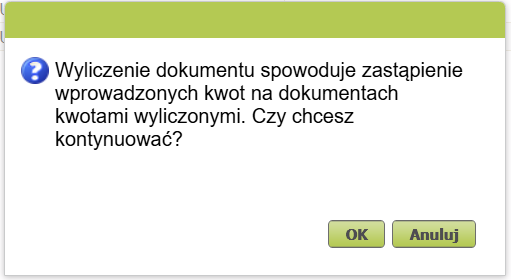
On the Utworzenie i walidacja dokumentów panel, click Wylicz.
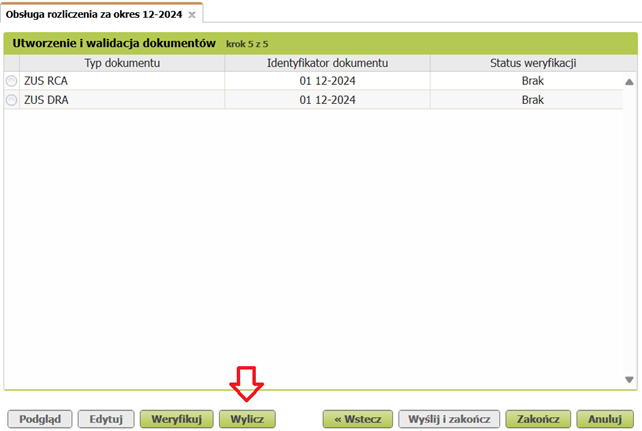
An informational message will pop up. Click Ok.
On the Utworzenie i walidacja dokumentów panel, click Weryfikuj.
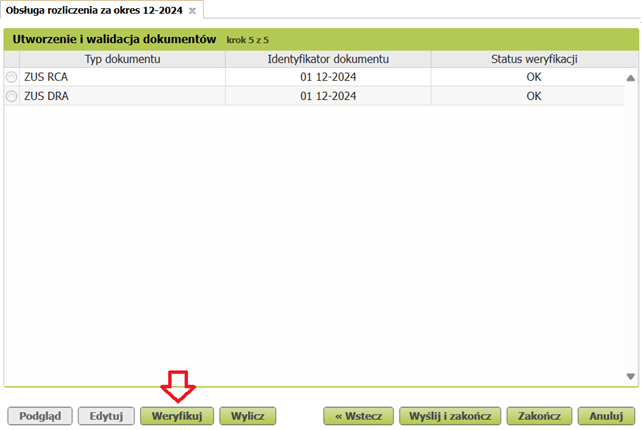
The declarations will be verified.
Reviewing the Created Declarations
To review the declarations, on the Utworzenie i walidacja dokumentów panel, select the desired element and click Podgląd.
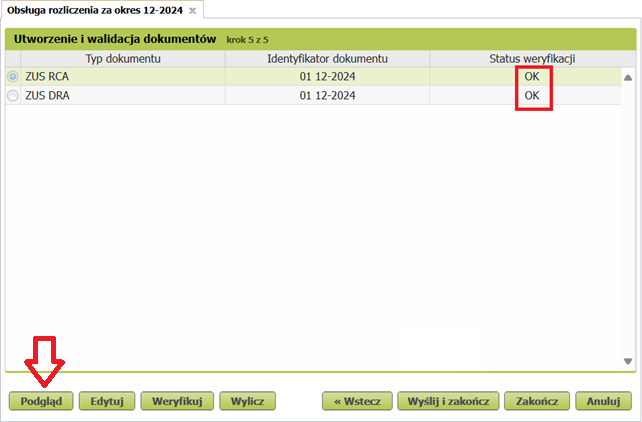
Two ZUS RCA declarations will be generated within one ZUS RCA element. To view both declarations, use the navigation buttons shown in the screenshot.
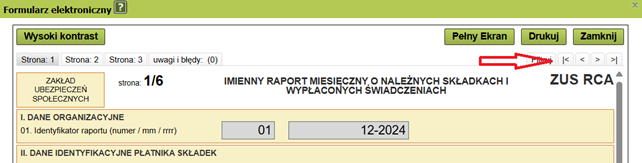
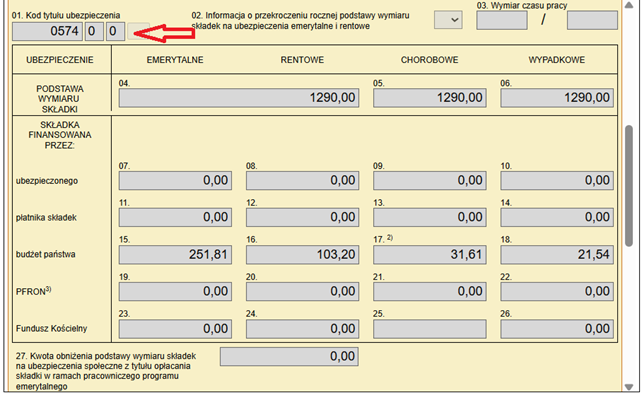
The social insurance contributions (emerytalne, rentowe, chorobowe, wypadkowe) paid by the state will appear in the declaration with code 057400. In the screenshot below, these are fields 15, 16, 17, 18.
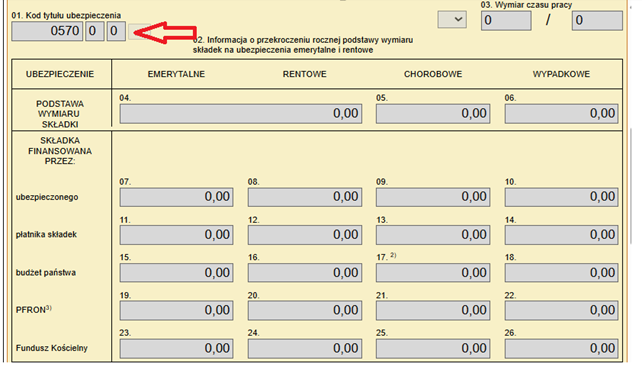
The social insurance contributions (emerytalne, rentowe, chorobowe, wypadkowe) paid by the entrepreneur will appear in the declaration with code 057000. In the screenshot below, these are fields 07, 08, 09, 10.
In the declaration with code 057000, the corresponding fields will contain the base and amount of the health insurance contribution (składka zdrowotna). Section III.C field 04 — this is the amount the insured entrepreneur must pay. The screenshot below shows the amount 699.11 zł, which may differ depending on your situation.

Sending the Declarations
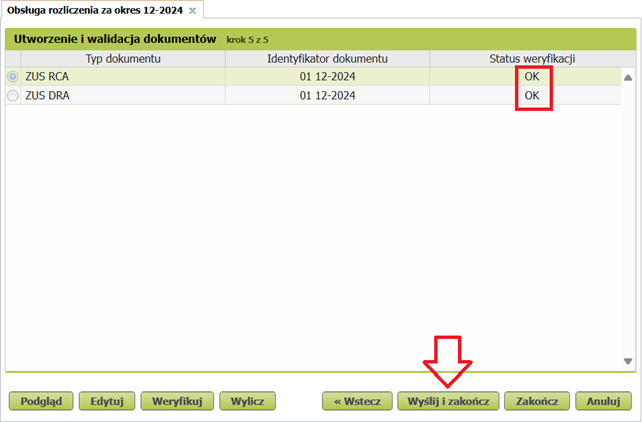
On the Utworzenie i walidacja dokumentów panel, click Wyślij i zakończ.
Sign the document using any of the listed methods.
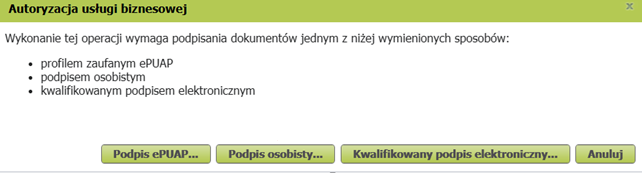
After signing, the document will be sent to ZUS.
Pitfalls
The benefit really is "free": the social insurance contributions you are exempted from are covered by the state budget. Nevertheless, there are a few nuances worth knowing about in advance:
- Ryczałt payers, watch the annual income limit for the składka zdrowotna rate. The vacation does not reduce your income, and the amounts saved on składki społeczne do not reduce your taxable base — crossing a threshold can therefore result in an additional składka zdrowotna payment in the annual settlement.
- Mały ZUS Plus. If you pay reduced income-based contributions, the benefit of the vacation is noticeably smaller — calculate whether it is worth the bureaucracy.
- Voluntary increased contributions. If you deliberately pay ZUS more than the minimum for the sake of your future pension, the vacation month uses only the minimum base. You cannot pay additional contributions on an excess above that base for the same month — see the ZUS explanation.
- Accountants may charge extra for filling in the RWS application and the non-standard settlement with ZUS for the vacation month. Check the fee with your accountant.
- The effect is delayed. Your ZUS payment will decrease not in the "vacation" month, but in the following month. And a month after that, the income tax due will be slightly higher — the saved składki społeczne will not reduce your taxable base.
- Switching from Preferencyjne to Duży ZUS. The exemption uses the minimum base applicable to you for the vacation month. When changing regimes, check the insurance code and base for that month; see the ZUS explanation of art. 18d.
Does the vacation affect applying for a residence card?
It has no effect at all. What matters is that the business has no break in activity or irregular income.
You Don't Lose Anything
The state finances contributions on the minimum base applicable to you for that month; they count towards your future pension. If you normally pay on a higher base, consider the restriction described above. Unlike a "pause" (zawieszenie) or sick leave, during ZUS vacation the entrepreneur can continue conducting income-generating activity and issuing invoices.
Conclusion
ZUS vacation is a great opportunity to reduce business expenses a bit and make your life easier. Just don't forget to carefully review the eligibility criteria and submit your application on time.
More detailed information about the benefits can be found on the official ZUS website.