Moving to the next regime
General info on start-up relief for businesses
When you first run a business in Poland, you can use several ZUS contribution regimes one after another: first Ulga na start, then Składki preferencyjne, then Mały ZUS+ (if you meet the conditions), and finally Duży ZUS. Each regime has its own deadlines, switching rules, and reporting codes. Stick to the filing deadlines when you change regime — that way you avoid fines and reporting mistakes.
Typical entrepreneur lifecycle
Starting point: you’re opening your first business in Poland or you haven’t run a business for a long time (you closed your previous company more than 60 months ago).
- With income up to 75% of the minimum wage, no contributions at all (Działalność nierejestrowa = unregistered activity).
- After registration, the first 6 full calendar months are Ulga na Start (6 full months plus a partial month if you didn’t open on the 1st).
- After Ulga na Start ends, you can move to Składki Preferencyjne (the next 24 months).
- After that, if income is still low, you can use Mały ZUS+ for 36 months.
- When every relief is used up, you must pay Duży ZUS in full.
From the “third level” onward, you can also take one month off ZUS per year.
Deadlines when switching between regimes
- The switch always applies from the 1st of the month. You have 7 days to file. If the last day is a weekend or holiday, the deadline moves to the next business day. Don’t leave it to the last minute.
- If you miss the deadline, you can still file later — there’s a small risk of a fine.
📅 Use our spreadsheet with key dates. Enter your real business start date and get a personalised timeline for free. Then add reminders in your calendar so you don’t miss these dates.
So: start the switch no earlier than the 1st of the month you already intend to pay social contributions at the new rate for — but don’t drag your feet, either, so you finish the switch before the 8th.
ZUS insurance title codes (table)
| Kod tytułu ubezpieczenia (Current value) | What it means | What to do | New code |
|---|---|---|---|
| 054000 | Ulga na start | Switch to Składki preferencyjne | 057000 |
| 057000 | Składki preferencyjne | Switch to Mały ZUS+ (see conditions) | 059000 |
| Or switch to Duży ZUS | 051000 | ||
| 059000 | Mały ZUS+ | Switch to Duży ZUS | 051000 |
| 051000 | Duży ZUS Full contributions, no relief | Nothing | — |
The table lists the most common insurance codes among sole traders. For more codes with the original descriptions, see List of ZUS insurance codes (2025).
Profession codes table
You’ll need to enter Kod wykonywanego zawodu (code of the profession you perform).
| Code | Profession (PL) | Profession (EN) |
|---|---|---|
| 251401 | Programista | Software developer |
| 251402 | Programista aplikacji mobilnych | Mobile app developer |
| 251903 | Tester oprogramowania komputerowego | Software tester |
| 243106 | Specjalista do spraw marketingu i handlu | Marketing and sales specialist |
Official site
All codes are in the profession description search tool (Wyszukiwarka opisów zawodów).
If you haven’t changed your line of business and just want to use the same code as before but forgot it, you can look it up in your original ZUS ZZA application on zus.pl: open e-Płatnik, go to Dokumenty → Dokumenty w ZUS, tick ZUS ZZA in the list, click Podgląd. In the document, find section V. TYTUŁ UBEZPIECZENIA I KOD WYKONYWANEGO ZAWODU and check item 02. Kod wykonywanego zawodu.
How to switch between ZUS regimes
You can do it online — no need to visit a ZUS office.
First log in to eZUS as described in the eZUS login guide.
Then pick the step-by-step guide you need and follow it.
1. Activating Ulga na Start
- When you register your JDG, register with ZUS using ZUS ZZA and pick the right code (0540 00).
- More detail: Ulga na Start — conditions and quirks
- Walkthrough: JDG registration
2. Switching to Składki Preferencyjne
- After 6 months of Ulga na Start, file the switch to the next relief (code 0570 00).
- Walkthrough: Switching to Składki Preferencyjne
3. Switching to Mały ZUS+
- After the preferential period ends (24 months preferencyjne), some of you — those who meet the conditions — can switch to Mały ZUS+ (code 0590 00).
- Walkthrough: TODO
4. Switching to Duży ZUS
- After the relief period ends (24 months preferencyjne or 36 months Mały ZUS+), switch to Duży ZUS (code 0510 00).
- Walkthrough: Switching to Duży ZUS
5. ZUS “holiday”
- If you’re no longer on Ulga na Start, you can take one month per year without paying social contributions (“holiday”).
- More detail: ZUS holiday — conditions and walkthrough
UPP — proof of submission
UPP = Urzędowe Poświadczenie Przedłożenia — the proof that ZUS received your declaration, generated by zus.pl. Without a UPP you can’t reliably prove printed ZUS ZUA / ZUS ZZA forms are authentic.
To prove you’re insured with ZUS, the Potwierdzenie ubezpieczenia certificate is usually better. See the residence permit document checklist.
If someone else filed ZZA/ZUA for you, ask them for the original declaration and its UPP.
If you use eZUS
For ZUA/ZZA/ZWUA, DRA and RCA declarations submitted through ePłatnik:
- Sign in to eZUS and select Konto płatnika. Open ePłatnik in the left menu.
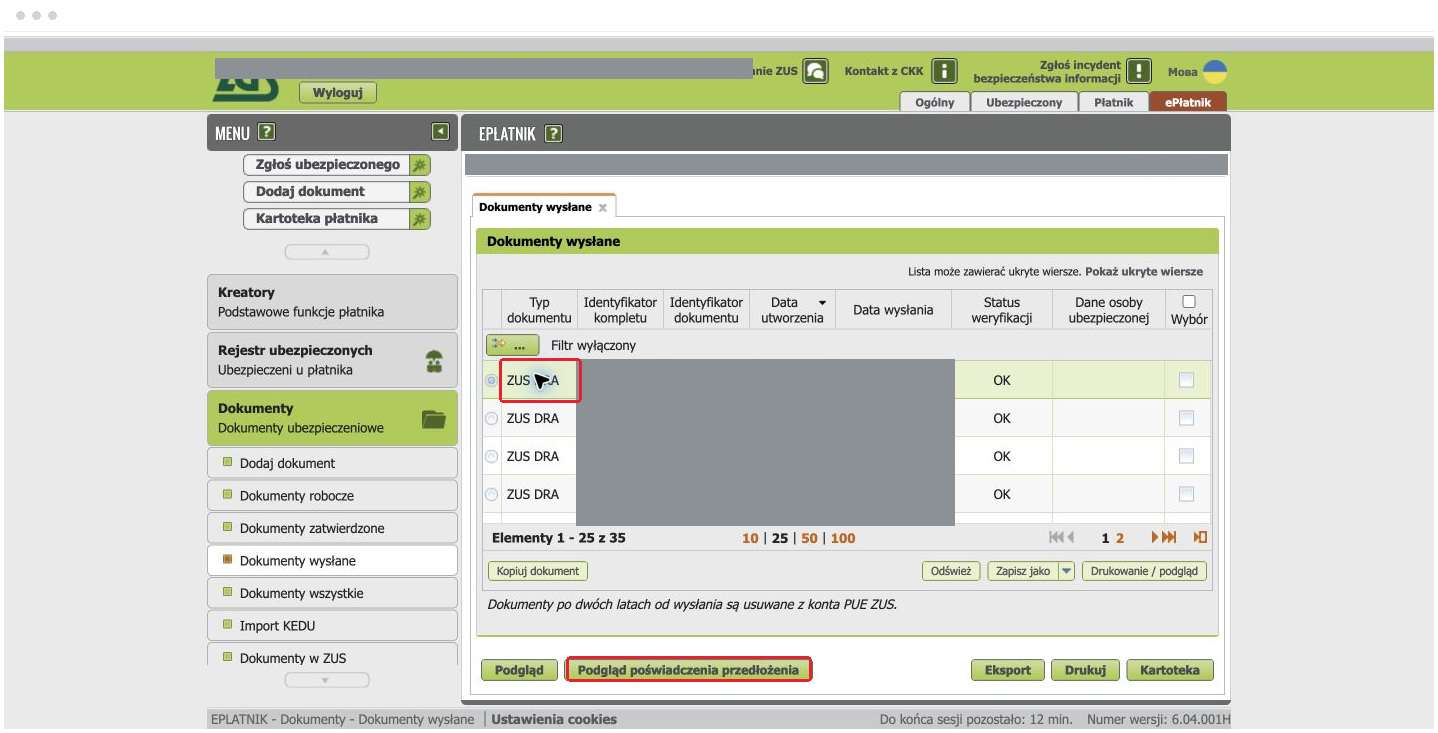
- In the previous interface, select Dokumenty → Dokumenty wysłane.
-
Select the relevant declaration and click Podgląd poświadczenia przedłożenia. The picture uses DRA as an example; for ZUA/ZZA/ZWUA, select your own declaration’s row.
-
In Urzędowe Poświadczenie Przedłożenia, click Eksportuj to save the receipt or Drukuj for a printed copy.

Keep your own copy of the UPP: ePłatnik warns that submitted documents are removed from the account after two years. If a declaration was sent from another program, request its UPP from the sender or find it in that program.
For RWS/RWN applications in the new Płatnik, use Sprawy płatnika → Według statusu → Wysłane → the relevant application → Zobacz szczegóły → Podsumowanie → UPP (XML).
If you use iFirma
In iFirma the document is easy to find:
Deklaracje → e-Deklaracje ZUS → table Deklaracje zgłoszeniowe → the declaration is in the Deklaracja column → download the UPP with the PDF button in the rightmost column.
Typical mistakes
If something goes wrong, check our error collection first.
Links
- Official source on transition deadlines: Pas startowy dla początkujących firm
- Tool to look up profession and specialty codes