Zakład Ubezpieczeń Społecznych
All entrepreneurs running a JDG in Poland are required to register with the national social insurance institution and pay insurance contributions.
Video
Almost everything you wanted to know about ZUS and weren't afraid to ask
Author: Andrei
Video contents:
- Types of ZUS contributions
- Differences between składka zdrowotna and other contributions
- Step-by-step walkthrough with a specific example
- Switching from Ulga na Start to składki preferencyjne
- Paying off last year's debt
- Choosing the składka zdrowotna level at the beginning of the year
- Nuances of suspending business activity
Contribution amounts
ZUS consists of 2 main parts:
- Health insurance (Składka zdrowotna)
- Social insurance, which includes
- Pension insurance (Ubezpieczenie emerytalne)
- Disability insurance (Ubezpieczenie rentowe)
- Accident insurance (Ubezpieczenie wypadkowe)
- Labour Fund and Solidarity Fund (Fundusz pracy i Fundusz Solidarnościowy)
- Sickness insurance (Ubezpieczenie chorobowe)
The monthly health insurance contribution is calculated using the formula base rate * 9%. The base rate depends on income:
- Income up to 60,000 PLN: The base rate is 60% of the average salary
- Income from 60,000 PLN to 300,000 PLN: The base rate is 100% of the average salary
- Income above 300,000 PLN: The base rate is 180% of the average salary
In actual numbers for 2026 (the average salary in the enterprise sector for Q4 2025 is 9,228.64 zł), this is:
- Income up to 60,000 PLN: 5,537.18 zł
- Income from 60,000 PLN to 300,000 PLN: 9,228.64 zł
- Income above 300,000 PLN: 16,611.55 zł
Plugging these numbers into the formula, we get the health insurance contributions:
- 5,537.18 * 9% = 498.35 zł
- 9,228.64 * 9% = 830.58 zł
- 16,611.55 * 9% = 1,495.04 zł
It is important to note that when a threshold is exceeded, recalculation applies retroactively to previous months.
Example:
Maksym is taxed under Ryczałt on registered income. In March 2026, Maksym's income exceeded 60,000 PLN, and in October it exceeded 300,000 PLN. What would the annual health insurance contribution calculation look like?
Over the course of the year, Maksym would pay health insurance contributions as follows:
- January — 498.35 zł,
- February — 498.35 zł,
- March — 830.58 zł (exceeded the 60,000 zł threshold),
- April — 830.58 zł,
- May — 830.58 zł,
- June — 830.58 zł,
- July — 830.58 zł,
- August — 830.58 zł,
- September — 830.58 zł,
- October — 1,495.04 zł (exceeded the 300,000 zł threshold),
- November — 1,495.04 zł,
- December — 1,495.04 zł
Over the year, Maksym paid health insurance contributions totalling 11,295.88 PLN: 498.35 * 2 + 830.58 * 7 + 1495.04 * 3.
Since Maksym exceeded the 300,000 PLN threshold for the calendar year, his monthly health insurance contribution should have been 1,495.04 PLN all along. Therefore, the annual contribution is: 1495.04 * 12 = 17,940.48, but the total amount Maksym actually paid from the example above was only 11,295.88 PLN. This means that after the annual reconciliation, Maksym has an outstanding balance on his health insurance. He must pay an additional 6,644.60 PLN: 17,940.48 - 11,295.88.
ZUS contributions infographic
Visit the website Składki ZUS (ryczałt) (2026).
ZUS contribution calculation table
2026 numbers, amounts in złoty per month, ryczałt taxation (only the składka zdrowotna depends on the taxation form).
Składki społeczne and Fundusz Pracy depend on the ZUS payment mode:
| Contribution | Ulga na start | Składki preferencyjne | Duży ZUS |
|---|---|---|---|
| Emerytalna | — | 281.44 | 1,103.27 |
| Rentowa | — | 115.34 | 452.16 |
| Wypadkowa | — | 24.08 | 94.39 |
| Fundusz Pracy | — | — | 138.47 |
| Mandatory total | 0 | 420.86 | 1,788.29 |
Składka zdrowotna is the same in every mode and depends on annual income:
| Annual income | Składka zdrowotna |
|---|---|
| up to 60,000 | 498.35 |
| 60,000 — 300,000 | 830.58 |
| above 300,000 | 1,495.04 |
Total per month (społeczne + Fundusz Pracy + zdrowotna):
| Annual income | Ulga na start | Składki preferencyjne | Duży ZUS |
|---|---|---|---|
| up to 60,000 | 498.35 | 919.21 | 2,286.64 |
| 60,000 — 300,000 | 830.58 | 1,251.44 | 2,618.87 |
| above 300,000 | 1,495.04 | 1,915.90 | 3,283.33 |
On top of that you may pay the voluntary składka chorobowa — sick leave and maternity: +35.32 on Preferencyjne and +138.47 on Duży ZUS. It cannot be joined while on Ulga na Start.
The health component (zdrowotna) must always be paid, even if you also have insurance through an employment contract. The health contribution provides access to medical services for the entrepreneur and their family members.
Social benefit entitlements depend on paying the social contributions. These include maternity leave, sick leave, and future pension payments, but these benefits are proportional to the amount on which you pay contributions. Sick pay and maternity benefit hinge on the voluntary składka chorobowa — it has a dedicated page. How pension contributions turn into your future pension is covered on the Pension page.
For the first 6 months you can take advantage of the "Ulga na start" relief and not pay social contributions. Accordingly, you will not be able to use social benefits either. After the startup relief expires, you can switch to the next relief — Składki preferencyjne — and use it for 24 months. After 30 months of activity you must switch to paying full ZUS (duży ZUS) — a minimum of 60% of the average salary.
More details at biznes.gov.pl and e-pity
Registration
An entrepreneur is required to register with ZUS within 7 days of registering a JDG. This can be done either during the business registration process or afterwards.
How to find your ZUS payment account
After registering the sole proprietorship, within approximately 2 weeks you should receive a letter (a physical envelope) from ZUS with all account details, etc., and the functionality will appear in your online account at eskladka.pl.
You can also check accounts on the aforementioned website by entering two identifiers: NIP and REGON (or NIP and PESEL).
How to pay ZUS
ZUS must be paid by the 20th of the month following the reporting month. For example, ZUS for July is due by August 20th.
Payment should be made via a standard bank transfer to your individual ZUS account. You can write anything in the payment description — it does not affect anything.
Certificate of no outstanding ZUS debt
- You can physically go to any ZUS branch (any branch, not necessarily your district's) and obtain all certificates with wet stamps
- You can request an electronic certificate in your eZUS account.
Select the RWN application
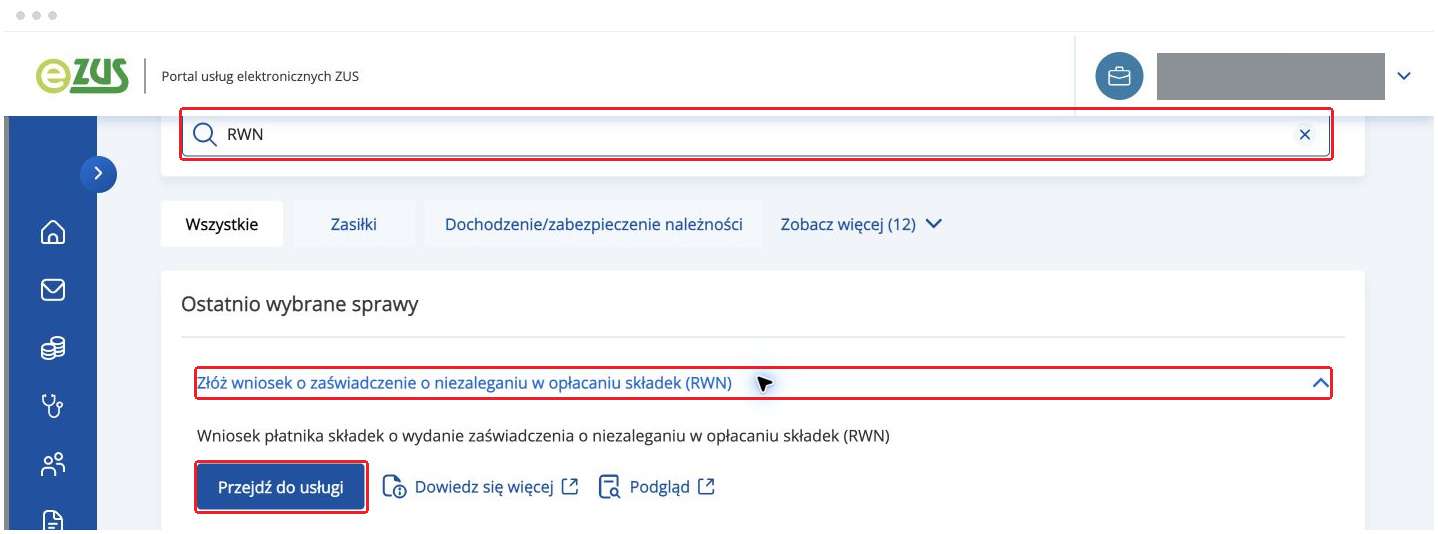
Sign in to eZUS and choose Konto płatnika for your JDG. Open Katalog usług in the left menu and enter RWN in Wyszukaj sprawę. Expand Złóż wniosek o zaświadczenie o niezaleganiu w opłacaniu składek (RWN) and click Przejdź do usługi.
Verify the form data
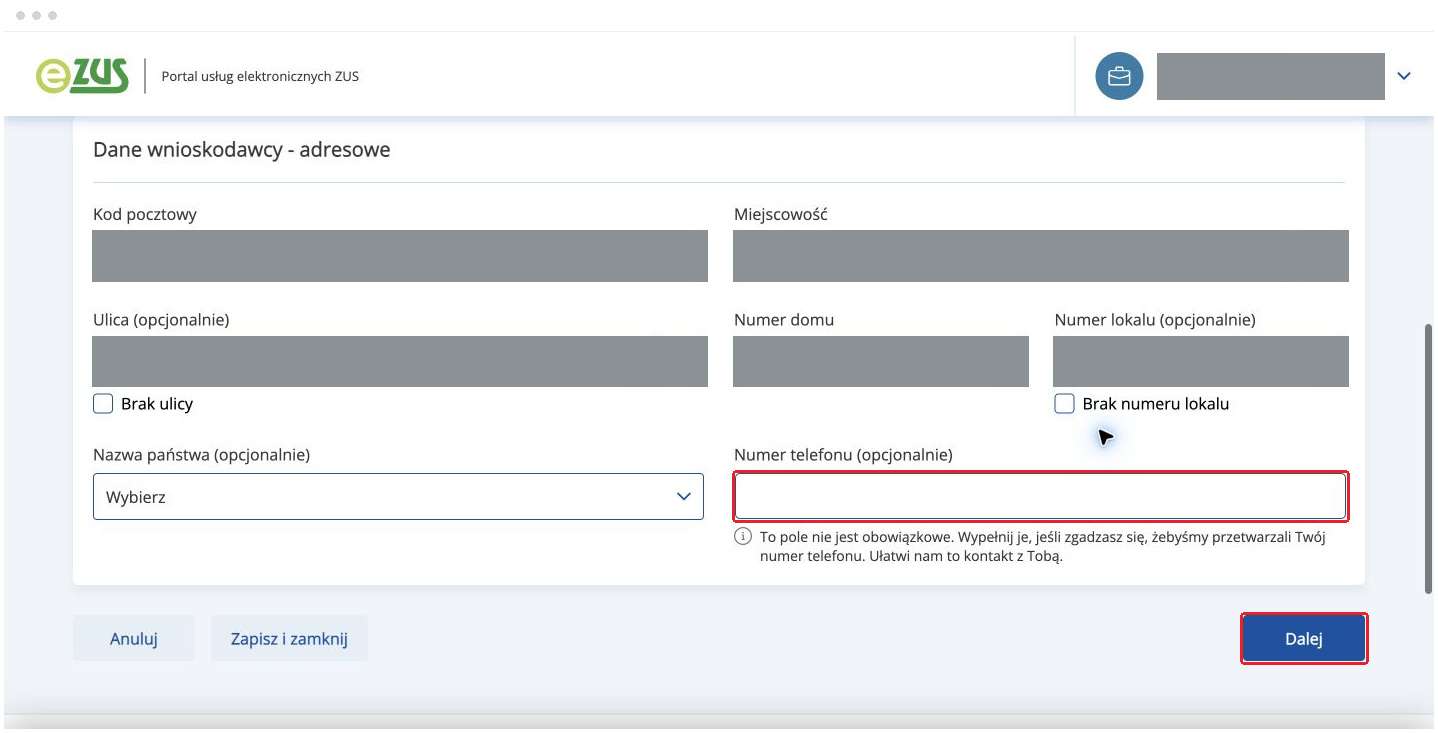
In Dane płatnika, check the automatically filled identifiers and address. The phone number is optional. Click Dalej.
Attachments
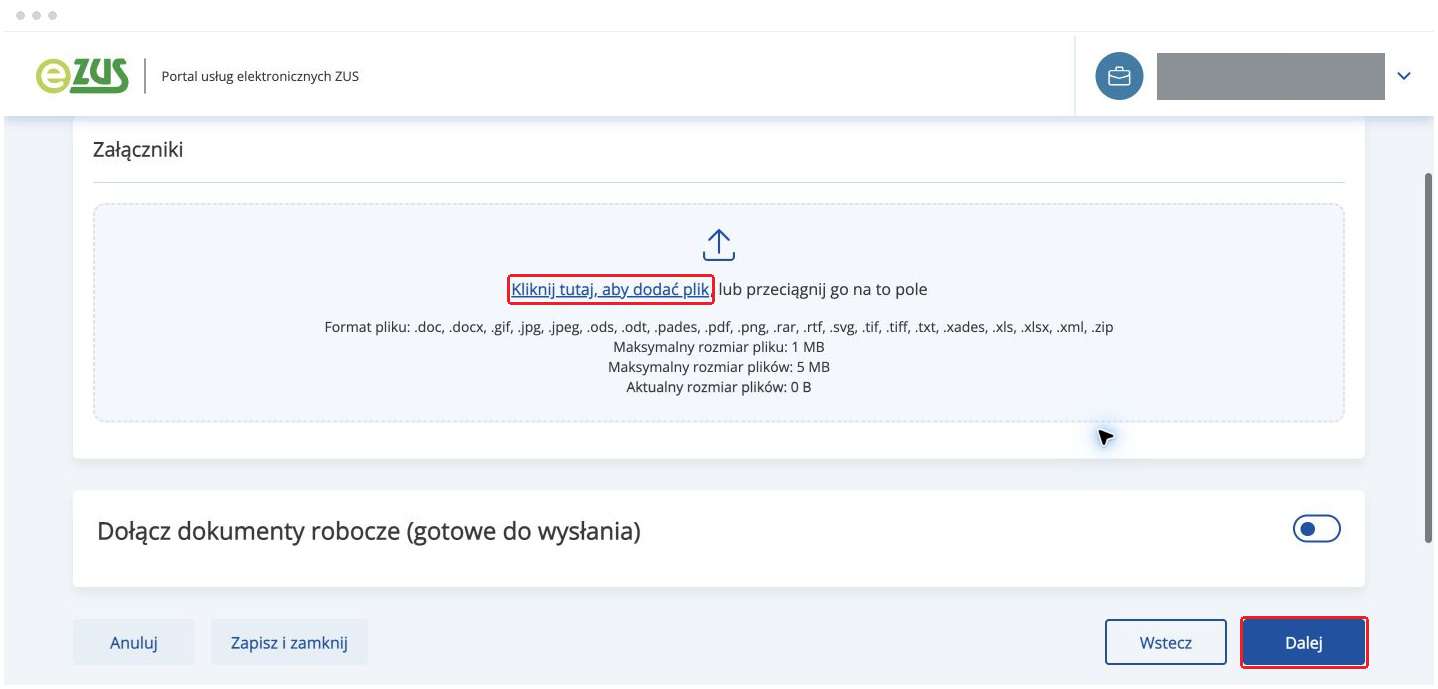
In Załączniki, add documents with Kliknij tutaj, aby dodać plik if needed. An ordinary certificate request can proceed without attachments: click Dalej.
Reply delivery
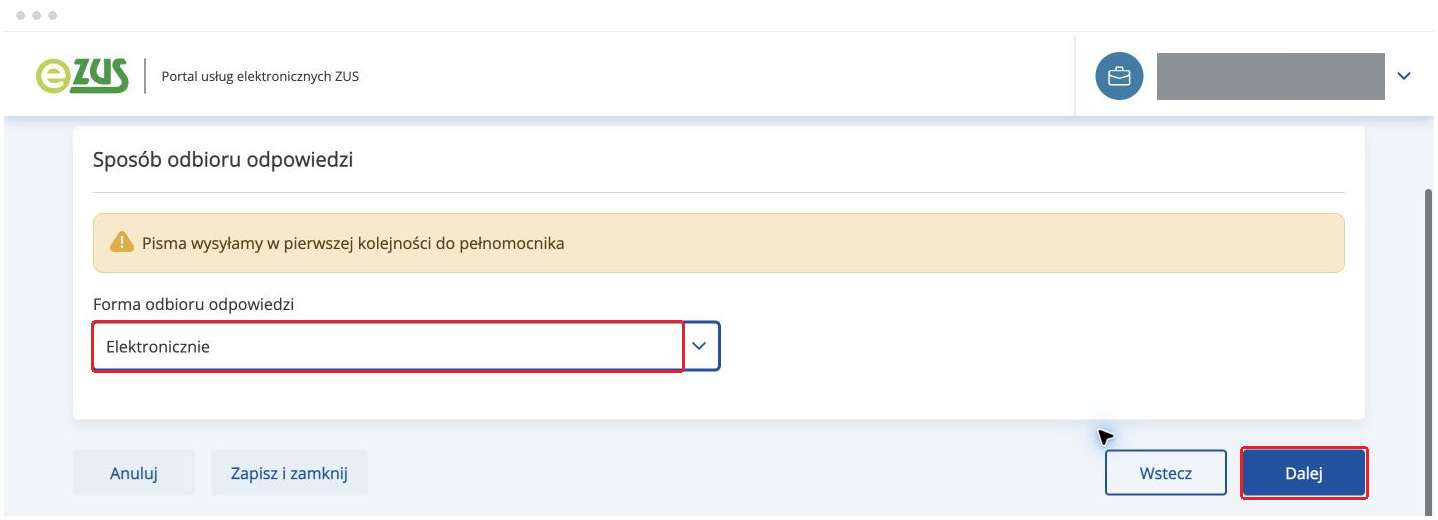
In Sposób odbioru odpowiedzi, check that Elektronicznie is selected and click Dalej.
Review the application
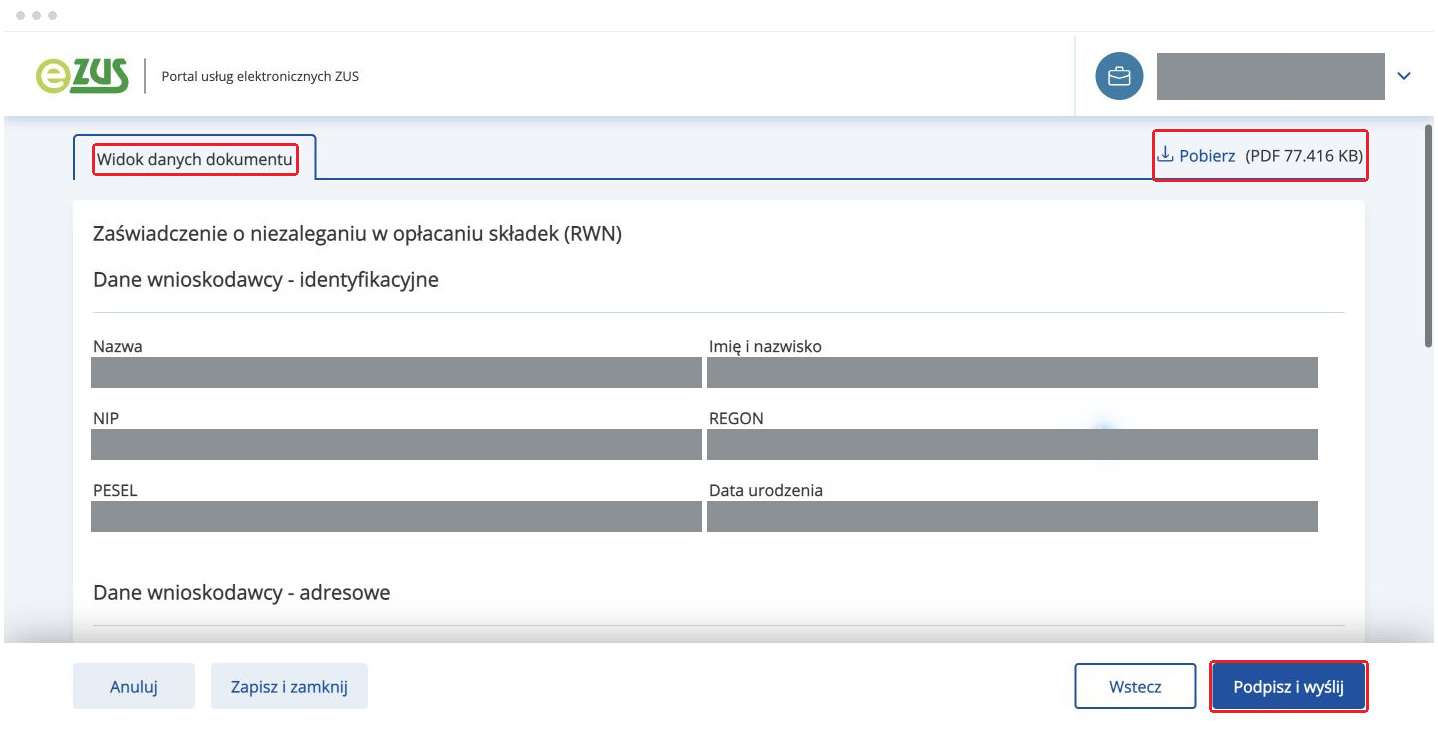
In Podsumowanie, review the application through Widok danych dokumentu or download its PDF with Pobierz. Then click Podpisz i wyślij.
Sign and send
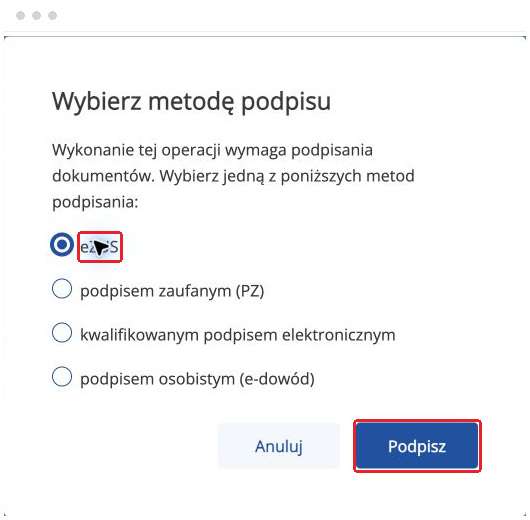
In Wybierz metodę podpisu, select eZUS to sign through the current account and click Podpisz. If using Profil Zaufany, select podpisem zaufanym (PZ) and complete the signature procedure shown.
Documents sent — wait for confirmation
After sending, open Sprawy płatnika → Według statusu → Wysłane, search for RWN and choose ⋯ → Zobacz szczegóły. The original application’s Podsumowanie contains the UPP (XML) submission receipt.
If you interrupted the wizard, the draft is in Robocze. A draft does not confirm submission.
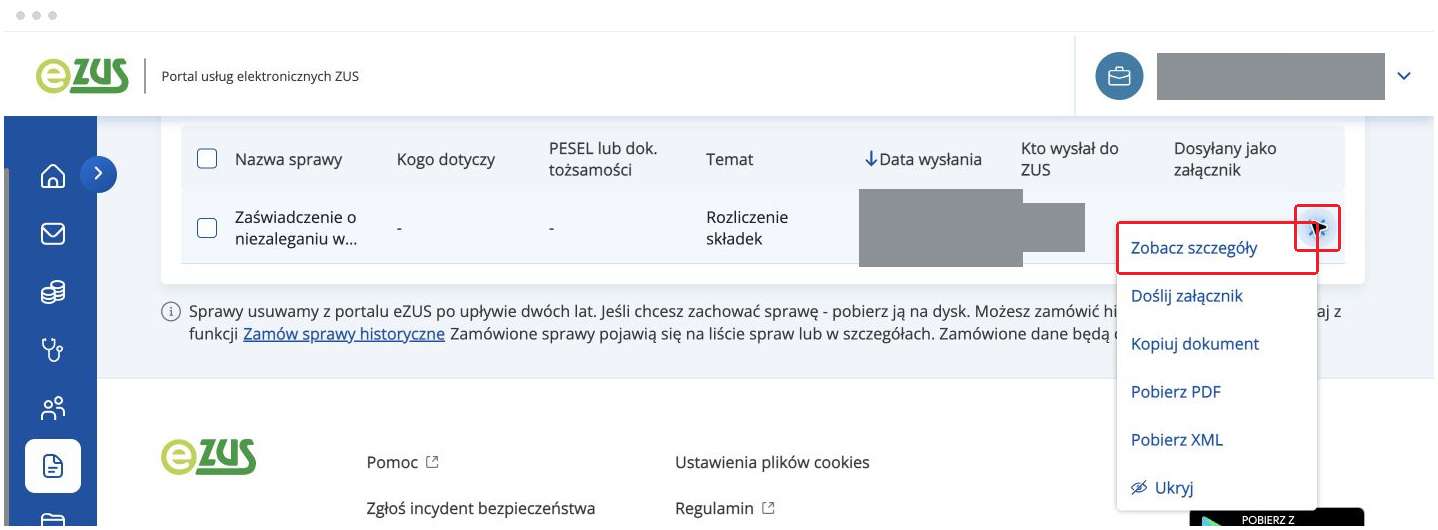
Retrieve the certificate
Wait for the ZUS reply: the form states a deadline of up to 7 days from receipt of the application. Inside the RWN case, open Odpowiedzi z ZUS. For an already received reply, choose ⋯ → Zobacz szczegóły. A new letter may first require Odbierz and confirmation of receipt. The picture shows an already received reply.
If you have an authorized representative (e.g. an accountant)
The new RWN form explicitly says: Pisma wysyłamy w pierwszej kolejności do pełnomocnika. If the certificate has not appeared in your account, ask your representative to check their correspondence and receive the ZUS reply.
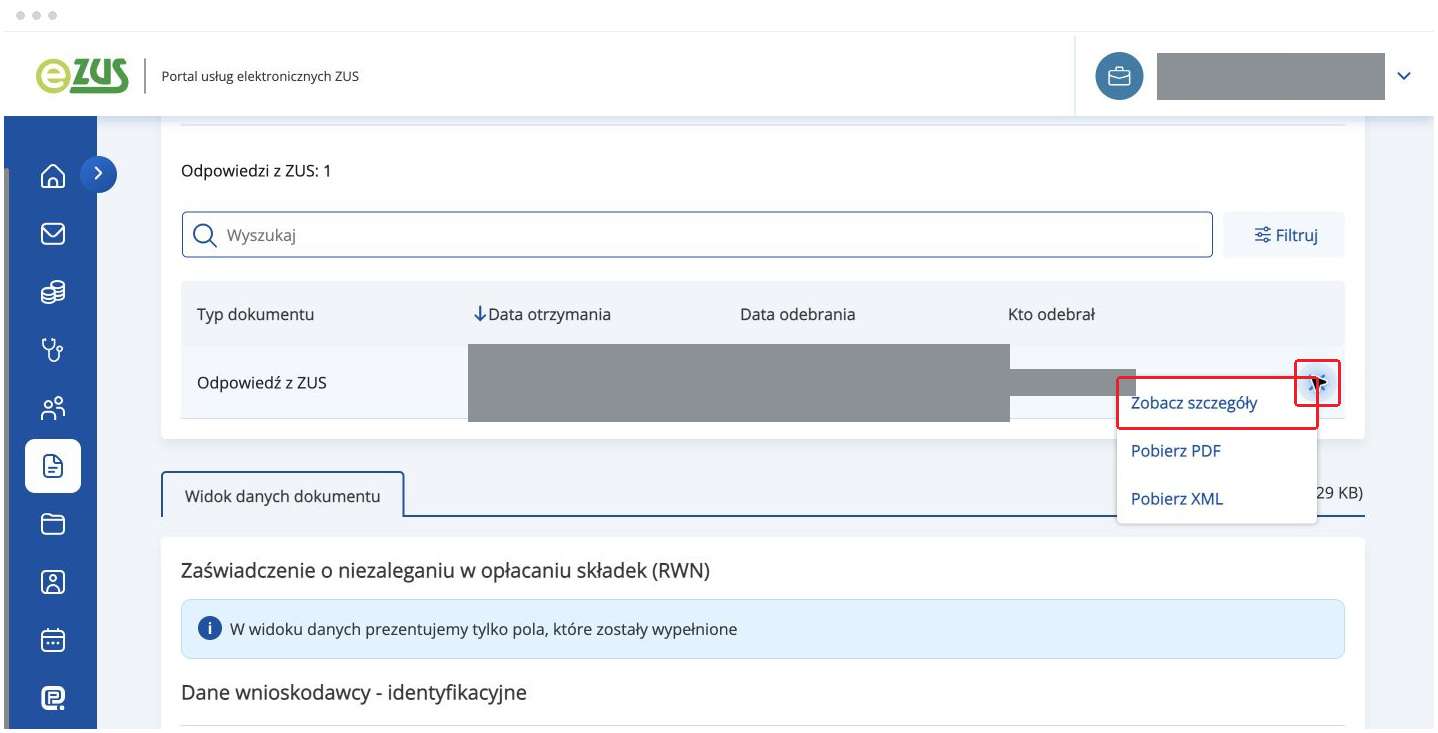
Download the certificate
In the reply’s Podsumowanie, download the certificate PDF — ZUS-S-72a.pades.pdf in this example. Keep the signed PDF as the electronic original. UPO (XML) in this section confirms receipt of the letter; the certificate itself is a separate PDF file.
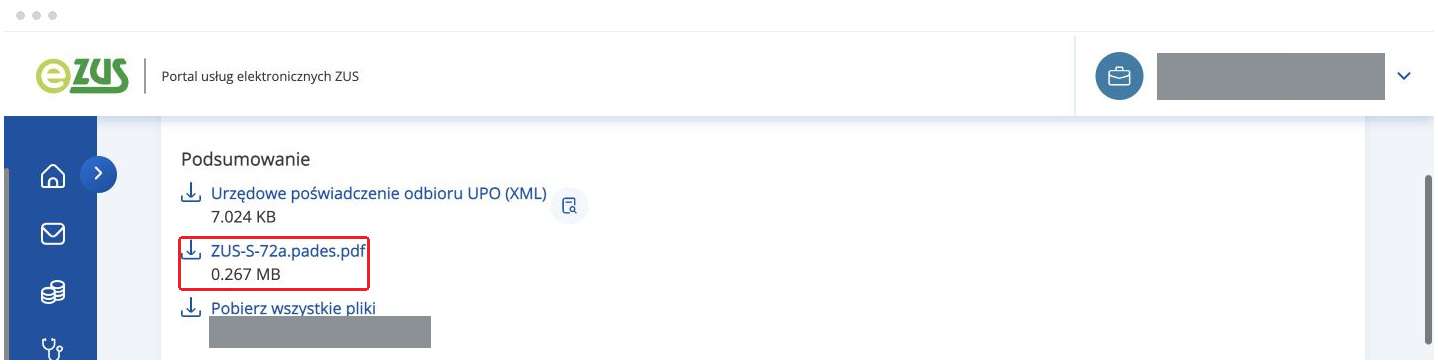
Health insurance certificate
To confirm your health insurance, you can obtain a certificate with an electronic signature on the zus.pl portal.
Konto indywidualne
From the new Płatnik, switch to Konto indywidualne through the name menu in the header. The Ubezpieczony section used to create this certificate still uses the previous interface.
- Go to zus.pl
- Select the Ubezpieczony section in the site header
- Select Panel Ubezpieczonego in the side menu
- Select the Zaświadczenia - ubezpieczenia menu item
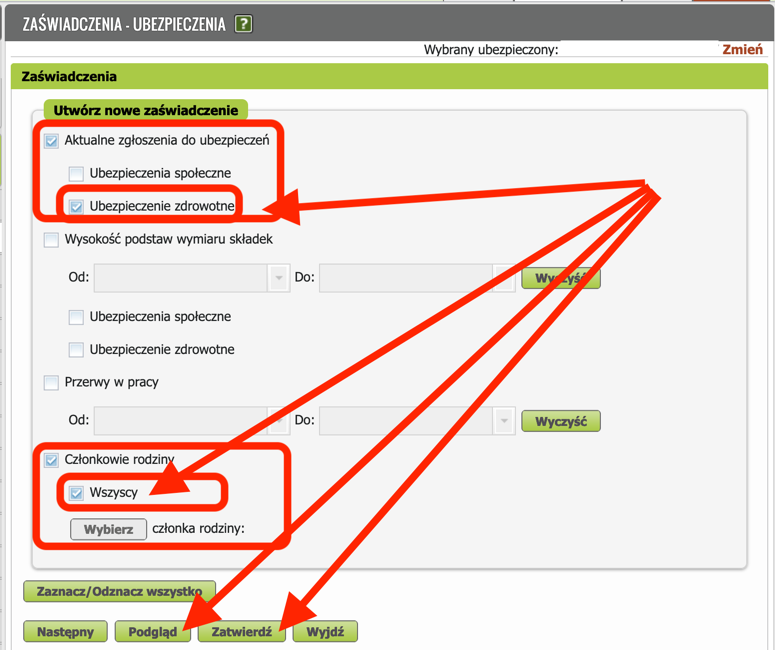
- Click the Utwórz nowy button at the bottom of the page
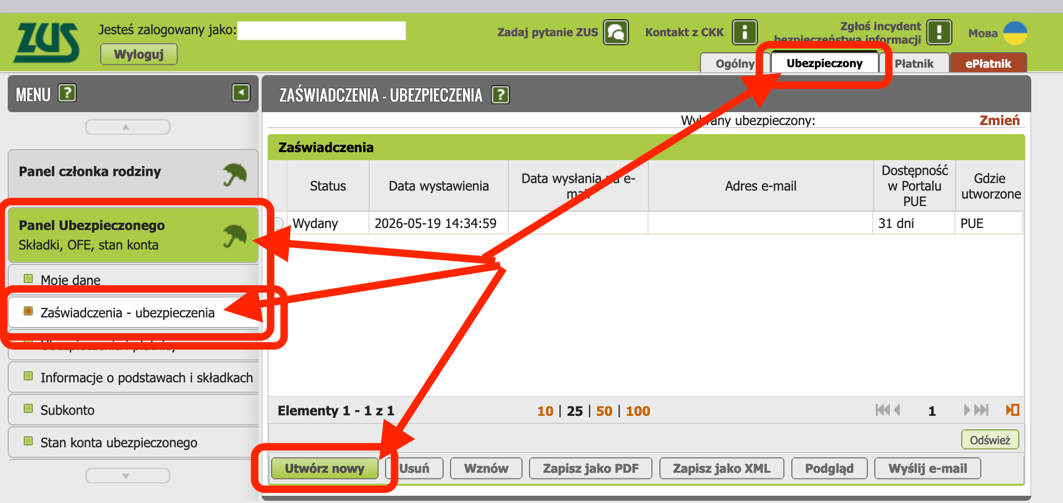
- Tick the Ubezpieczenie zdrowotne checkbox
- Tick the Członkowie rodziny - Wszyscy checkbox (if the certificate is also needed for family members — in case they do not have their own health insurance)
- Be sure to click Podgląd to unlock the Zatwierdź button
- You can review the opened Podgląd and close it
- Click the Zatwierdź button to send the document to ZUS for signing
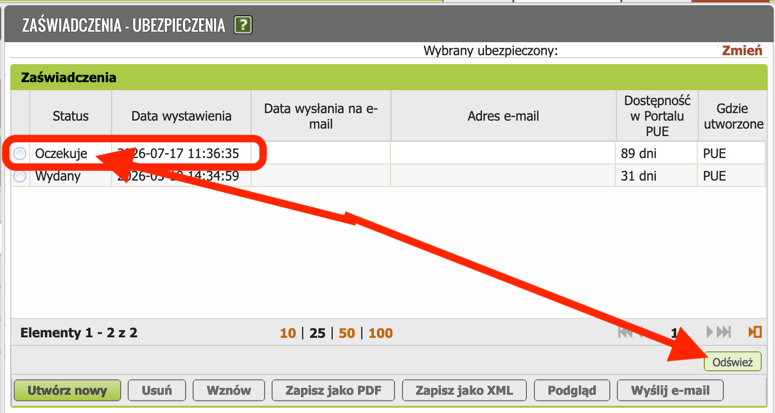
- A new row with the status Oczekuje will appear in the document list. At this moment automated systems are signing the document with an electronic signature. This process takes from a couple of seconds to a couple of minutes.
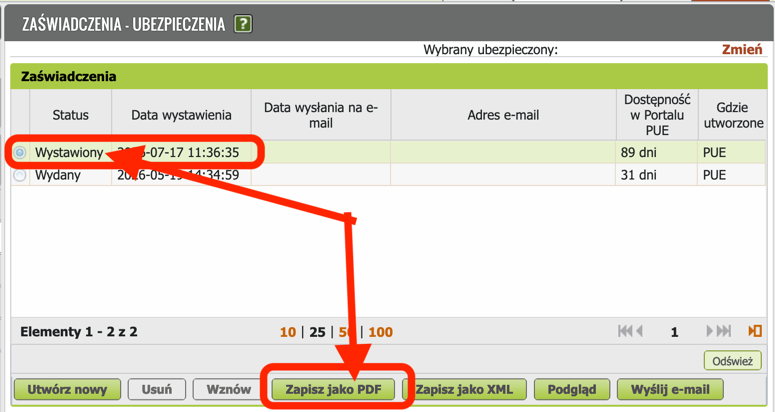
- Click the Odśwież button periodically until the status changes to Wystawiony
- Click the Zapisz jako PDF button and choose a location on your device to save the PDF file.
- As a result, you will have a genuine electronic document from ZUS, signed with a qualified electronic signature. You can send this document via e-Doręczenia and attach it to MOS2 with a clear conscience. In this case, the electronic document is the original, and the matter is settled.
- To make sure the PDF is signed, you can go to any electronic signature verification service, for example, the government document signing website
- Click Dodaj plik
- A Sprawdź, kto podpisał button will appear on the attached file
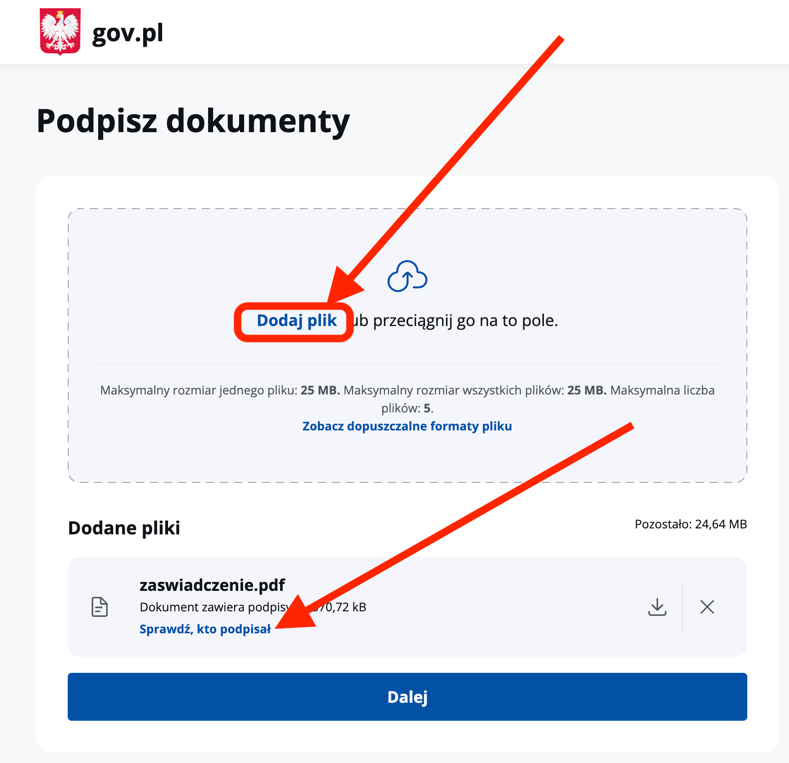
- The modal window that opens will show information about the authority that signed the document — Zakład Ubezpieczeń Społecznych (ZUS)
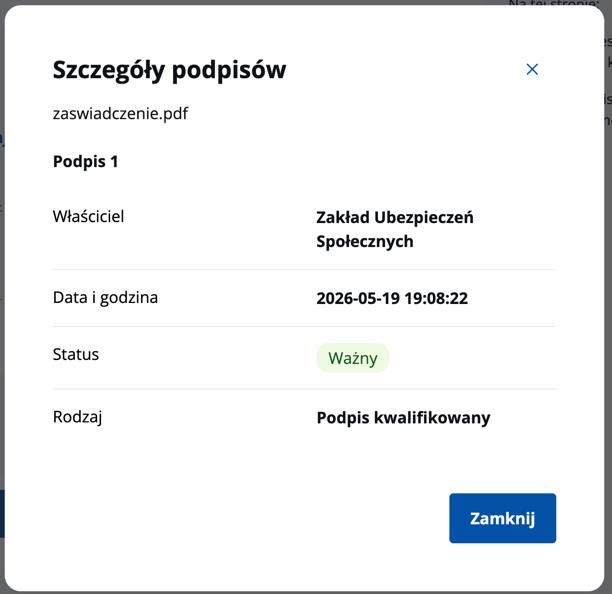
- Attach this document in MOS2 or any other electronic service whenever you need to prove that you or your family members have insurance.
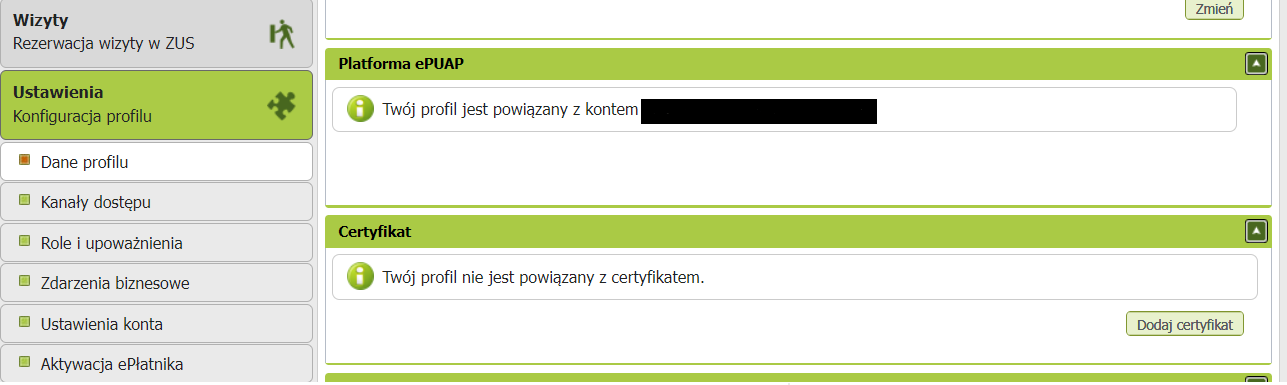
Linking ePUAP to your ZUS profile
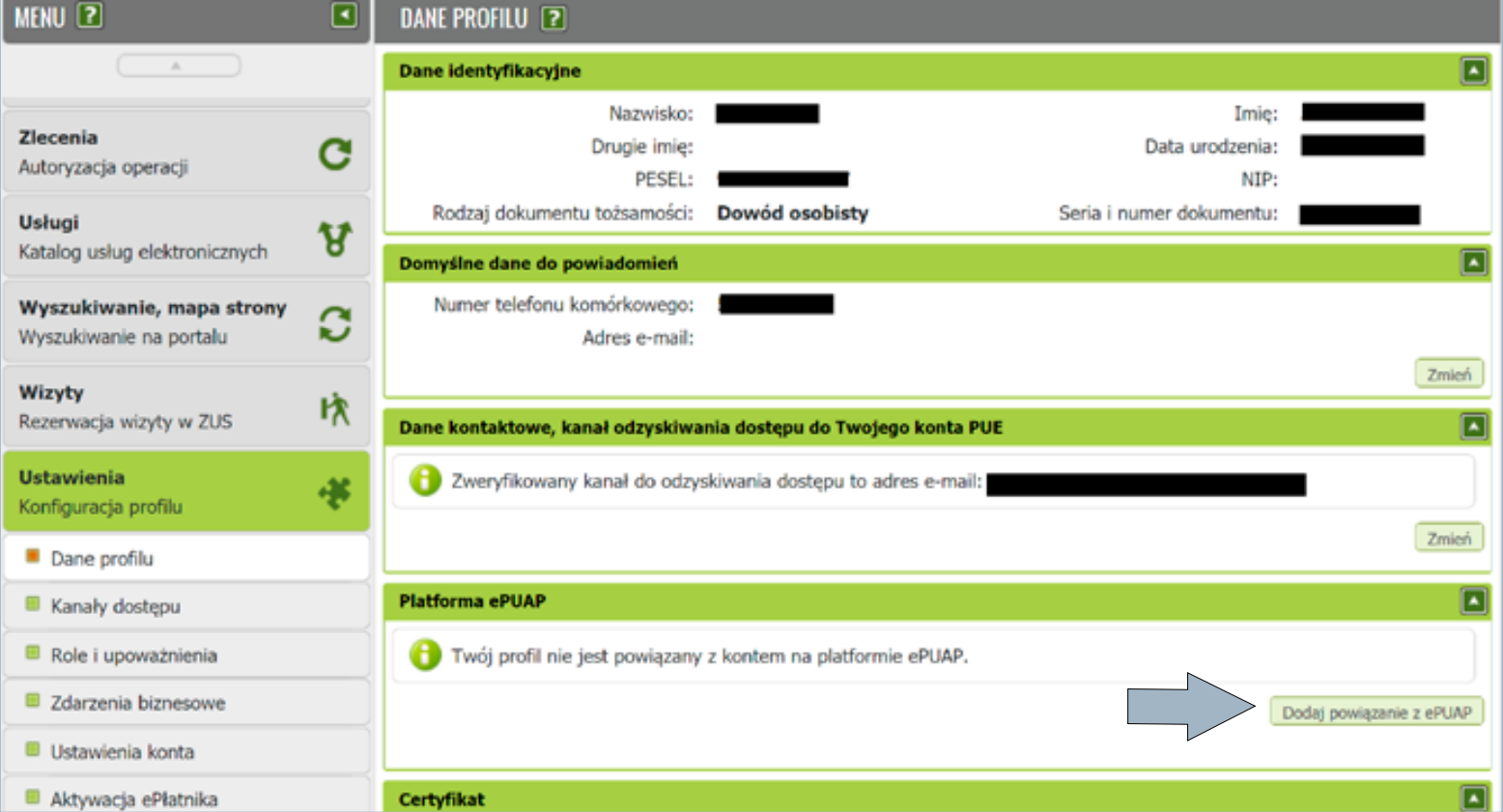
- If you have a profil zaufany, choose Konto indywidualne, then open Ogólny → Ustawienia → Dane profilu in the previous portal and click Dodaj powiązanie z ePUAP.
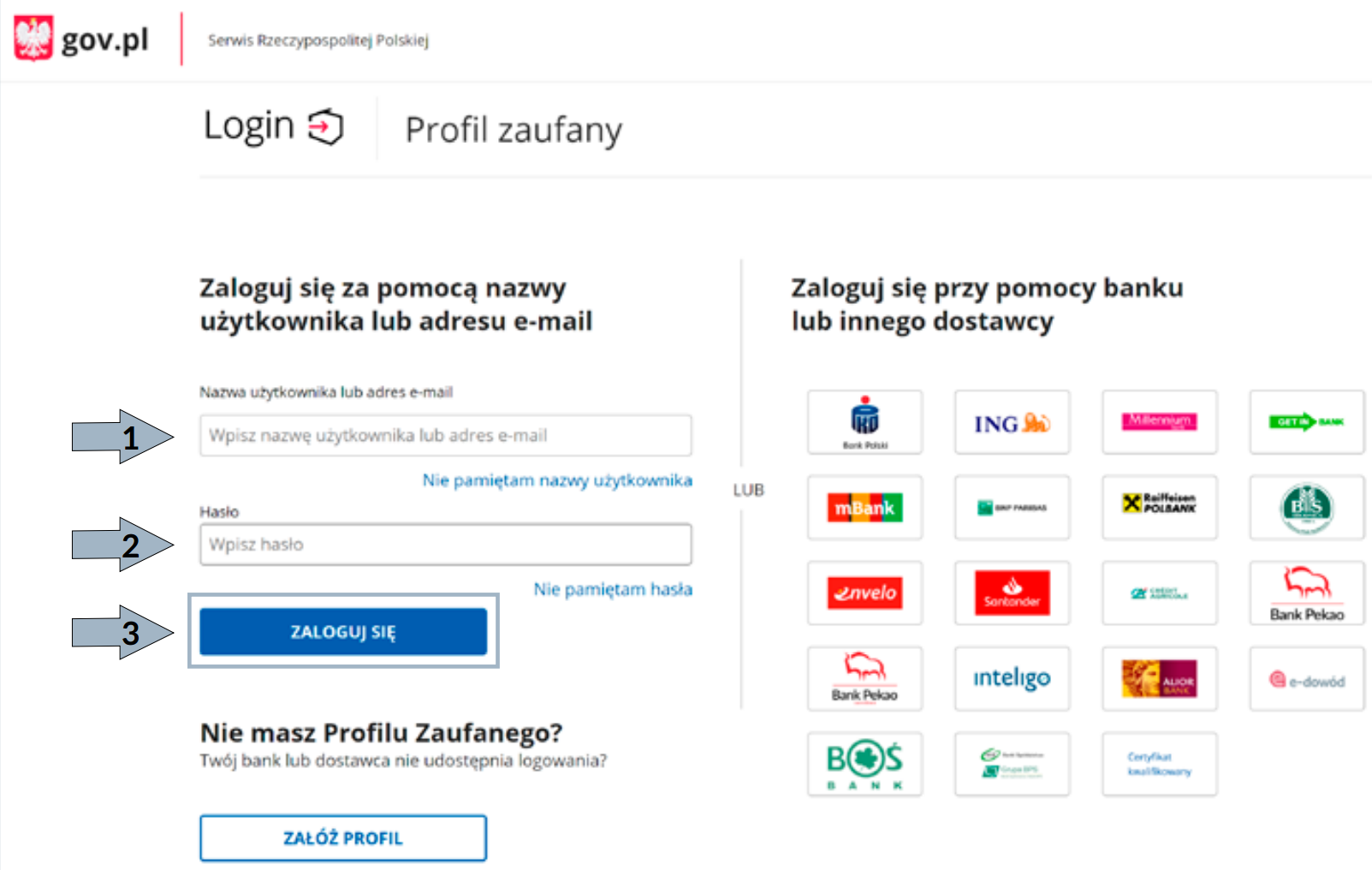
- You will be redirected to the trusted profile login page — log in and sign with profilem zaufany.
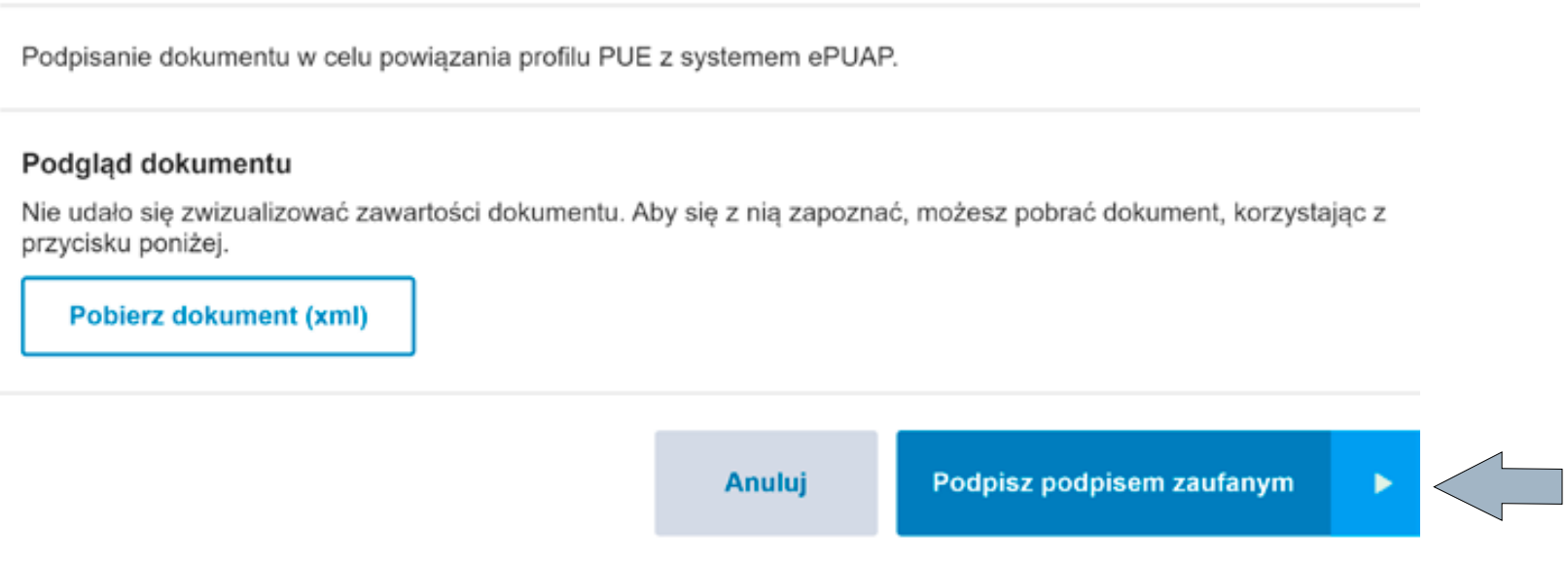
- As a result, your ZUS profile will be linked with profilem zaufanym.